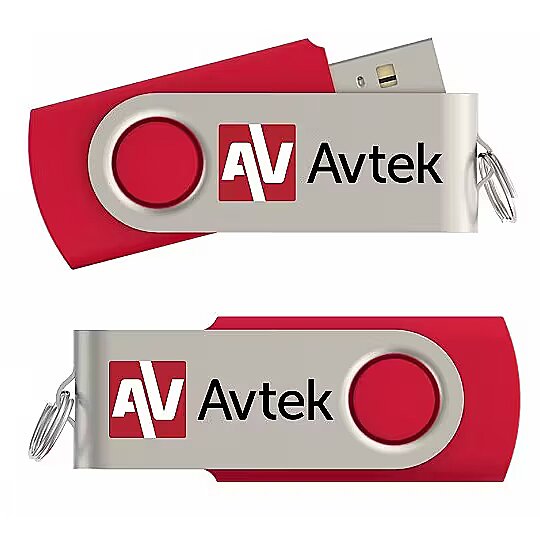
Apraksts - Tā ļauj aktivizēt Android 11 sistēmu interaktīvajā monitorā TS 8 Easy. Aktivizēšanu veic, pieslēdzot pendrive atbilstošajam USB pieslēgvietai (skatiet instrukcijas) un pēc tam sekojot monitora ekrānā redzamajiem norādījumiem. Aktivizēšana aizņem ne vairāk kā dažas minūtes. Android sistēmā ir iebūvēti šādi rīki: ScreenShare - ļauj attālināti pieslēgties monitoram WriteBoard - programma, kas ļauj vadīt mācību stundu vai biznesa prezentāciju Palette - zīmēšanas rīks rīks, kas ļauj vadīt balsošanu rīks, kas ļauj strādāt dalītā ekrānā Piezīme Katram monitoram ir ieprogrammēta atsevišķa taustiņa, kas darbosies tikai ar vienu norādīto monitoru (tā nedarbosies ar citu TS 8 Easy sērijas monitoru) Ja tiek veikts atsevišķs pasūtījums atslēgas iegādei iepriekš iegādātam TS 8 Easy sērijas monitoram, ir jānorāda tā monitora sērijas numurs, kuram tiek iegādāta Android aktivizācijas atslēga Ativizācijas atslēgu neizmetiet. Glabājiet to drošā vietā. Ja atjaunosiet monitora rūpnīcas iestatījumus, atslēga būs jāaktivizē atkārtoti. Lai aktivizētu Android, pievienojiet pendrive USB 3.0 pieslēgvietu (pirmā pieslēgvieta monitora augšējā kreisajā pusē).
Apzīmējums - CE+WEEE
Barošana - barošanas avota tips - USB
dimensijas dziļums - 1 mm
dimensionalWeight - 12
ean - ABEAN-TL71198
Funkcijas - Ierīču saderība - Piemērots tikai TS 8 Easy sērijai
Funkcijas - Sertifikācija - Katram monitoram tiek ieprogrammēta atsevišķa atslēga, un tā darbosies tikai ar vienu norādīto monitoru (nedarbosies ar nevienu citu TS 8 Easy sērijas monitoru) Atsevišķi pasūtot atslēgu iepriekš iegādātam TS 8 Easy sērijas monitoram, ir jānorāda tā monitora sērijas numurs, kuram ir iegādāta Android aktivizācijas atslēga Neizmetiet aktivizācijas atslēgu. Ja atjaunosiet monitora rūpnīcas iestatījumus, atslēga būs jāaktivizē atkārtoti. lai aktivizētu Android, USB zibatmiņu ievietojiet USB 3.0 pieslēgvietā (pirmā pieslēgvieta no monitora augšējā kreisā stūra).
Funkcijas - USB ports - Jā
Funkcijas - USB savienotāja tips - USB tipa B
garantija - 24
garantijas_tips - ārējais
garantijaType - F
guaranteeLength - 24
izmērs augstums - 240 mm
izmērs platums - 130 mm
izmērs svars - 7 g
Krāsa - Black
Krāsa - Pelēks
Krāsa - Sarkanais
Krāsa - White
nosaukums - Aktivizēšanas atslēga Android TS 8 Easy
producerCode - 1TV333
productName - Aktivizēšanas atslēga Android TS 8 Easy
productSize - Parasts
ražotājs - Avtek
Saderīgs ar - TS 8 EASY
Savienotāji - 1 x USB 3.0
sizeX - 80
sizeY - 15
sizeZ - 50
svars - 14
Svars un izmēri - Augstums - 10 mm
Svars un izmēri - Dziļums - 10 mm
Svars un izmēri - Iepakojuma svars - 100 g
Svars un izmēri - Platums - 50 mm
Svars un izmēri - Svars - 50 g
vendpn - 1TV333
Description - It allows you to activate the Android 11 system on the TS 8 Easy interactive monitor. Activation is done by connecting a pendrive to the appropriate USB port (see instructions), and then following the instructions on the monitor screen. Activation takes a maximum of a few minutes. The Android system has built-in tools, including: ScreenShare - allows remote connection to the monitor WriteBoard - an application that allows you to conduct a lesson or business presentation Palette - a drawing tool a tool that allows you to conduct voting a tool that allows you to work on a split screen Note A separate key is programmed for each monitor, which will only work with one specified monitor (it will not work with another TS 8 Easy series monitor) In the case of a separate order for a key for a previously purchased TS 8 Easy series monitor, it is necessary to provide the serial number of the monitor for which the Android activation key is being purchased Do not throw away the activation key. Keep it in a safe place. If you restore the monitor to factory settings, you will need to reactivate the key. To activate Android, plug the pendrive into the USB 3.0 port (the first port from the top left of the monitor)
Designation - CE+WEEE
Power - Power supply type - USB
dimension depth - 1 mm
dimensionalWeight - 12
ean - ABEAN-TL71198
Features - Device compatibility - Fits the TS 8 Easy Series only
Features - Certification - An individual key is programmed for each monitor and will only work with the one monitor indicated (will not work with any other monitor in the TS 8 Easy series) When separately ordering a key for a previously purchased monitor in the TS 8 Easy series, it is necessary to provide the serial number of the monitor for which the Android activation key is purchased Do not throw away the activation key. Keep it in a safe place.If you restore the monitor to factory settings, you will need to re-activate the key. to activate Android, insert the USB flash drive into the USB 3.0 port (first port from the top left of the monitor)
Features - USB port - Yes
Features - USB connector type - USB Type-B
guarantee - 24
guarantee_type - external
warrantyType - F
warrantyLength - 24
dimension height - 240 mm
dimension width - 130 mm
dimension weight - 7 g
Color - Black
Color - Gray
Color - Red
Color - White
name - Activation key for Android TS 8 Easy
producerCode - 1TV333
productName - Activation key for Android TS 8 Easy
productSize - Normal
producer - Avtek
Compatible with - TS 8 EASY
Connectors - 1 x USB 3.0
sizeX - 80
sizeY - 15
sizeZ - 50
weight - 14
Weight & dimensions - Height - 10 mm
Weight & dimensions - Depth - 10 mm
Weight & dimensions - Package weight - 100 g
Weight & dimensions - Width - 50 mm
Weight & dimensions - Weight - 50 g
vendpn - 1TV333