Asus Vivobook 16X K3605VU-WS96 Intel® Core™ i9 i9-13900H Laptop 40.6 cm (16") WUXGA 16 GB DDR4-SDRAM 1 TB SSD NVIDIA GeForce RTX 4050 Wi-Fi 6E (802.11ax) Windows 11 Home Silver New Repack/Repacked

News
Free delivery in Riga with a courier.
ID: 1297459 Product code: K3605VU-WS96
Can be ordered 11 units Availability: 14 days after order approval
Warranty: 2 years
1,122.01 €
Ready for dispatch
02.01.2026
starting from 0 €
Delivery options
  • Receiving goods at the Dateks office
    0.00 €
  • DPD Pickup Parcel Cabinet
    Within 1-2 working days
    0.00 €
  • Parcel terminal
    Within 1-2 working days
    0.00 €
  • Post Office
    Within 1-2 working days
    0.00 €
  • Omniva parcel machine
    Within 1-2 working days
    0.00 €
  • SmartPosti parcel terminal
    Within 1-2 working days
    0.00 €
  • Delivery in Riga
    0.00 €
  • Delivery throughout Latvia.
    Within 1-2 working days
    4.99 €
Main product parameters All parameters
  • Refresh rate: 120Hz
  • Screen size: 16"
  • Screen resolution: 1920x1200 (Full HD+)
  • RAM: 16 GB
  • RAM type: DDR4
  • SSD: 1 TB
  • Graphics card model: NVIDIA GeForce RTX 4050
  • Operating system: Windows 11 Home
  • Keyboard language: ENG
  • Keyboard lighting: Ir (Single colour)
  • Battery: 70 Wh
Display characteristics
Refresh rate : 120Hz
Screen size 16"

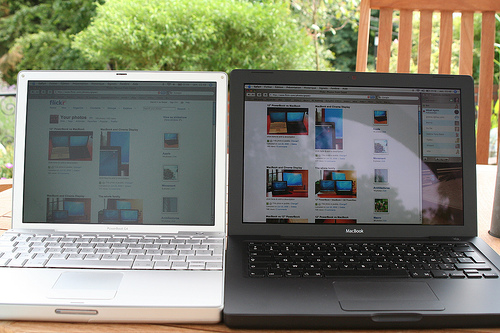
The display size describes the size of the visible part of the screen of your portable computer across the diagonal in inches. Average portable computers have 15.4" standard or 15.6" wide-screen displays. The ultra compact category portable computers have the display size of about 10,1".

Some portable computers have the option of turning the screen to the angle of 180 degrees and close it with the keyboard – the result is a true tablet computer without a keyboard. These models are sometimes referred to as transformers or tablets - they can be used both as a standard portable computer and as a tablet computer. This option is very handy for reading or, for example, drawing when the keyboard is not required.

Portable computers that are positioned as a replacement of desktop computers sometimes have the screen as big as 17". A bigger monitor is usually required for editing graphics or reviewing big-size tables, etc. However, it has to be considered that a bigger screen means a bigger size and usually also a bigger weight of the computer, besides it can be damaged more easily during opening and closing.

Screen resolution 1920x1200 (Full HD+)

The maximum resolution of the display indicates the number of colour points (pixels) on the computer screen. The higher the resolution the better quality (more detailed) image. For example, 1366x768px means that your computer has 1366 points horizontally x 768 points vertically. High resolution provides more information on the screen and this is directly related to the size of the screen. Nowadays even a 12.1 inches screen can have 1024x768 resolution. At the first glance it looks that this resolution is too high for this size of the screen, however, high resolution provides more comfort.

WVGA (800x480) is characteristic for old portable computers and mini tablet computers of the new generation. WSVGA – ultra mobile portable computers with the display of 10.1’’ (the resolution of 1024x600 can be seen more often).

WXGA (1280x800) – this resolution is mainly characteristic of 12.1’’, 13.3’’, 14.1’’ screen with the relation of sides of 16:9.

HD 1366x768 and 1600x900 is a widespread resolution for the budget and middle class portable computers.

Full HD (1920x1200) resolution combined with high capacity video cards (NVidia Quadro FX vai ATI FireGL) is intended for the professional level 3D modelling work.

WUXGA (1920x1200) – ultra extended graphical arrangement (screen16:10) is intended for watching HD TV.

Attention has to be paid also to the contrast and brightness of the screen. The screen must have the maximum brightness for using the portable computer even in very bright lighting conditions.

Display type LED AntiGlare

The screens of portable computers are divided into Glare, or flossy and AntiGlare, or mat. The advantage of the flossy screen is better contrast, colours and sharpness, therefore this type of monitor is preferred by home users. The disadvantage of this screen is the glare which disturbs seeing the image in bright lighting.

AntiGlare, or mat screens to some extent prevent the glare problem by "scattering". This type of screen is usually used in business class computers intended for working with documents and accounting systems.

Display panel type : IPS
Touchscreen Nav
Unused
Basic information
Color : Silver
Use : Home/Business, Gaming
Processor parameters
CPU cores 14

This index determines the number of cores in the computer CPU. Each core is like a separate CPU that is capable of operating various applications separately. Thus, if there are several cores the operating system of the computer can distribute the load evenly between cores, so that the computer user can, for example, listen to music, browse the Internet and download files at the same time.

CPU core clock 2.60 GHz

The processor clock frequency is among the main criteria of the processor performance. This index determines the number of operations that each CPU core can perform per second. The higher the CPU clock frequency the faster the computer will be perform the given computing tasks.

CPU TurboBoost frequency 5.40 GHz
The ability of the CPU to increase the performance (the clock frequency) of one or several cores on the account of the stand-by of other cores. This function is switched on only when the computer needs an additional capacity "push".
Processor Threads 20 Threads

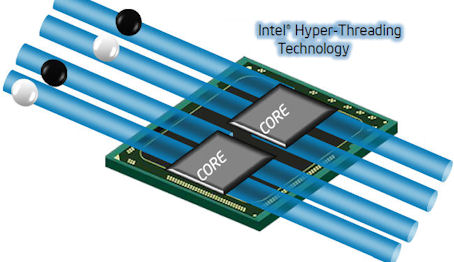
HyperThreading is the ability of the computer CPU to process several data flows in each core. For the two core CPU the HyperThreading is 4 and it means that certain tasks can be handled by this two core CPU at the same quality as the four core CPU.

CPU cache 24 MB

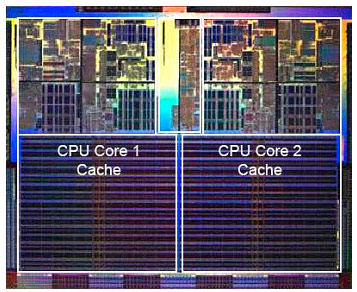
The CPU cache memory is the place where the CPU stores (buffers) the data intended for processing for a short time. The volume of the cache memory is important in determining the high-speed operation of the CPU and, thus, the overall high-speed operation of the computer itself. Bigger volume of cache memory means higher-speed operation.

Random-access memory (RAM)
RAM 16 GB

RAM is a short-term data storage. This component determining the operation speed:

  • allows the CPU of your computer to have fast access to the information that needs to be processed used by the computer application which you have opened;
  • at the moment of opening an application stores it in its microchips, thus the memory capacity determines how many applications can be run by your computer simultaneously and also with how big data volume (pictures, texts, webpages) you can operate at once.

Thanks to the dense placement of chipsets the RAM of a portable computer has the same characteristics as the RAM of desktop computers. Dateks.lv recommends to use 3Gb or higher capacity RAM for general use.

RAM type DDR4

This criterion determines the type of the RAM used by the computer,m and this is useful if you want to buy an additional memory module when you buy the computer or upgrade the existing RAM capacity in future.

The newest type of memory is DDR3. DDR2 represents an older generation accordingly.

RAM type 3200 MHz
The high-speed operation of the RAM as well as the upgrading possibilities are determined by the index - the type of RAM. Dateks.lv recommends to buy a portable computer with DDRIII type RAM.
Free ram slots Nav
Free memory slots indicate the upgrading possibilities of a portable computer determining how many additional memory modules can be added to this portable computer. The possibilities of upgrading the RAM also depend on the type of the RAM as well as on the amount of Mb included in the basic setting of the computer.
Maximum RAM upgrade option 32 GB

Maximum RAM is the indicator of the upgrading possibilities of the portable computer determining how many Mb of RAM are supported by * this model of the portable computer.

*The possibilities of upgrading the RAM depend on the number of available free memory slots and on the amount of Mb memory in the basic configuration of the computer.

Hard drive
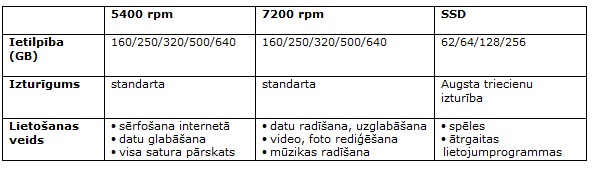
SSD 1 TB

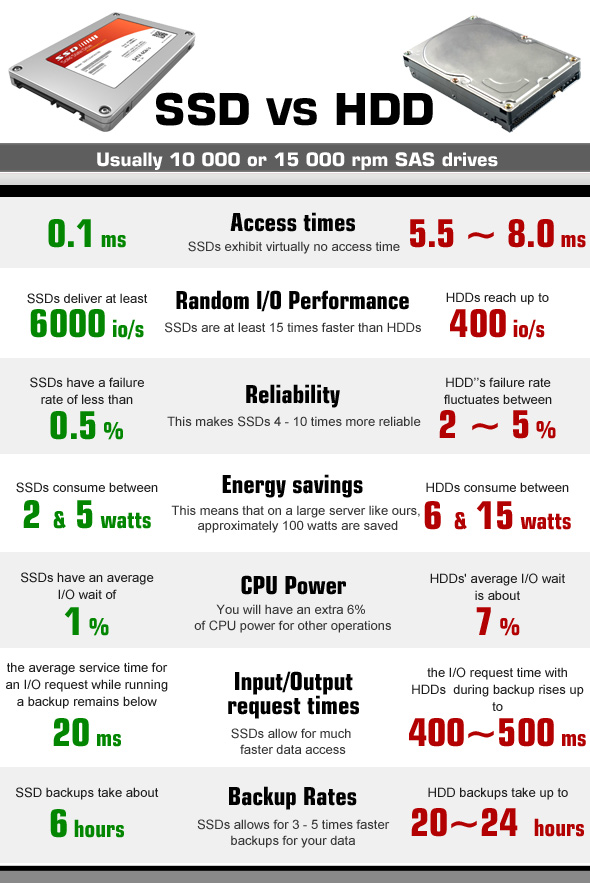
AnSSD, or Solid State Drive, is a modern storage device that, unlike hard disk drives (HDDs), has no moving parts and stores all information on NAND memory chips. This is why SSDs are much more reliable, as they can withstand shock, vibrations and temperature changes much better. The main advantage is the high data transfer speeds as well as the lowaccess time. Currently, SSDs equipped with a SATA 3 port deliver data transfer speeds of 500 MB/s on average. However, some drives using M.2 or PCI-Express ports have data throughputs

of up to

2000 MB/s.

HDD 0 GB

The hard disc is a component of the portable computer storing the operating system, applications and your files. Its size determines how many applications and files can be stored there. The capacity of the hard disc is measured in Gigabytes.(Gb).

When you select the capacity of the hard disc you have to consider what you plan to store there in the near future. Data volume will most probably increase and the new technologies will require higher memory capacity.

Graphics card
Video card manufacturer : NVIDIA
Video card Performance : 6 GB
Graphics card model NVIDIA GeForce RTX 4050

Video card is a device that displays information on the screen of a portable computer. This parameter indicates what is the model and manufacturer of the video card integrated with the portable computer. However, you can forget the visually impressive and 3D graphics shooting or driving games because this is an integrated video card. An integrated video card usually uses a fraction of the basic memory of the portable computer.

For office and study use Dateks recommends to buy a portable computer with Intel HD Graphics video card.

For playing 3D games and using graphics applications we recommend to buy a portable computer with ATI Radeon, Intel HD or Nvidia GeForce series video card. If 3D modelling is the major type of use - AutoCAD, Maya, 3DMAX, we recommend to buy a portable computer with Nvidia Quadro or AMD FirePro card.

The parameter "video card memory" indicates whether the video card will use a fraction of the RAM of the portable computer for performing its functions or the video card has own memory of a certain amount of MB.

Operating system
Operating system Windows 11 Home

The indicator "operating system" determines what legal operating system license is included with the computer. The license of the operating system guarantees the legal use of the computer operating system attested by a legal document – Genuine sticker on the housing of your portable computer.

OEM means that you are buying a computer with the operating system enclosed and you use this operating system in the computer with the relevant Genuine license sticker on teh housing. The price of the OEM license is much lower than the standard Retail license price that you have to pay if you want to buy software after you have bought the computer.

Dateks.lv recommends to buy a portable computer with MS Windows 7 OEM operating system.

The Microsoft® Windows® 7 OS is secure and easy to use. Your daily tasks can be performed and browsing can be done with a less number of clicks, the tasks can be performed better, it is fast, secure and reliable. With Windows 7 you will discover new possibilities of your portable computer.

Windows® 7 Home Premium – opens unbelievable entertainment possibilities offered by your portable computer, you will be able to watch your favourite TV shows, enjoy photos, films or the music collection.

Windows® 7 Professional – provides all that is necessary for your work and home.

Windows® 7 Ultimate – has been created for people who want to have all. It combines both Home Premium entertainment features, as well as business features for professionals with added security and flexibility making the work in several languages easier.

*The operating system of portable computers has been partially installed which means that when the computer is switched on it is necessary to enter the user's login data. After the data are entered the installation procedure of the operating system is automatically completed. This process can take up to 1 hour. During this time the portable computer must remain switched on and connected to a continuous power supply source.

Ports and equipment
Headphone Jack Yes

If you want to connect portable headphones or stand-alone, more powerful speakers to your computer you should certainly look for a computer with the connection slot for headphones.

If you don't make your choice at once later it will be necessary to buy an external sound card which is an additional expense and quite often not a very convenient solution.

Microphone in Combo

This index determines whether the portable computer has the 1.8" mini-jack stero connector for connecting the classic headphones or computer speakers.

If this connection is not available it will be necessary to buy the USB sound card for connecting these devices and this is an additional expense and inconvenience.

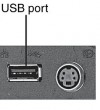
Pieslēgvietas USB Type-A 2.0 1

USB 2.0 is the most popular connection slot for the computer peripheral devices. Thanks to this connection slot it is possible to connect mice, keyboards, webcams, printers, USB flash memories, external HDDs and numerous other devices to the computer. The higher the number of available USB2.0 ports, the better.

Pieslēgvietas USB Type-A 3.0 2

USB 3.0 is the newest and fastest USB standard that allows to connect all the devices of the preceding USB2.0 generation and the new USB3.0 generation.

The true advantage of this connection can be seen when the USB3.0 external HDD or the USB3.0 flash memory is connected to the USB3.0 connector. This speed of operation of this solution can exceed the predecessor USB2.0 standard by several times and even the current speed record holder - FireWire connection.

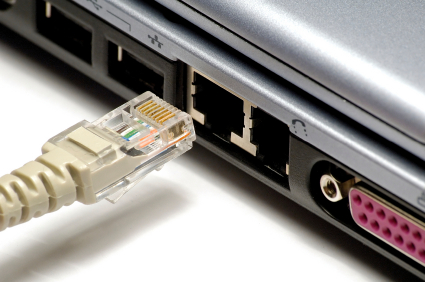
Port LAN (RJ-45) Is

TheLAN, or Ethernet, port allows you to connect your computer to a router, modem or switch for internet connectivity. As wireless internet connections, or Wi-Fi, are becoming more and more popular nowadays, laptop manufacturers are slowly moving away from providing this port in their products. If you don't have a wireless router or want to use the maximum speed of the optical internet, make sure your computer has a LAN or RJ45 socket.

D-SUB Nav

D-SUB is the classic (analogous) connection plug of monitors, projectors and other external video devices. This standard is gradually disappearing from the market leaving the space for much higher quality HDMI or DisplayPort (digitālajiem) plugs.

USB Type-C ports : 1
Ports Mini DisplayPort Nav

DisplayPort digital connection for transmitting the image and sound via one wire at high quality. Contrary to the HDMI, this connection allows to connect several external monitors to the computer by using a single connector.

Prior to buying the portable computer with the DisplayPort you should verify whether your monitor or TV set has the available DisplayPort plug.

HDMI Ir

HDMI is the digital image and sound transmission standard that allows to connect a TV set, monitor or projector supporting HDMI to the computer via the HDMI cable.

Cardreader SD

This device allows to copy photos from the memory cards of digital cameras without connecting the camera. All you have to do is to insert the relevant card in the reader and all its content is available in the computer at the very same moment.

There are different types of cards (SD, MMC, xD, MS Pro, etc.), therefore you should verify whether the selected card reader supports the required type of the card.

WebCam Ir
By means of the transmission of the video image the webcam allows to communicate via skype, to participate in video conferences as well as to use vast possibilities offered by the Internet world.
Wireless connections
WWAN Nav
Unused
Bluetooth Ir

Bluetooth connection provides secure wireless data transmission among various devices (at the distance of up to 150 m). This is a possibility for your portable computer to connect with your mobile phone, another portable computer, palmtop and other bluetooth devices without using any wires for exchanging Mp3 music, photos and documents. You can use bluetooth for connecting wireless headphones with a microphone, mouse, keyboard, printer and other devices supporting bluetooth connection.

Examples of use of the Bluetooth technology:

• transfer of files between computers or between a computer and another device;

• printing using Bluetooth enabled wireless printer;

• use of a Bluetooth equipped keyboard or mouse, listening to music via wireless headphones;

• synchronisation of the personal digital assistant (PDA) with a computer or another device;

• wireless connection to the Internet via the mobile phone or the modem server;

• connection to the Bluetooth personal network (PAN - this is the technology that allows to establish the Ethernet network with wireless links between portable computers, mobile phones and hand devices).

*For establishing a connection with a portable computer with bluetooth; all the devices to be connected need the bluetooth support.

Wi-Fi Wi-Fi 6E (802.11ax)

Wireless is the wireless network connection via which the computer will be connected to the router or the access point. Nowadays the 802.11 B/G/N connection with the highest speed operation (150 -300 Mb/s) and highest security is most popular.

Via 802.11 B/G it is also possible to connect to virtually all network, just the maximum speed will be 54 Mb/s in connections to the N type network.

Keyboard
Keyboard language ENG

Which keyboard should be chosen - English or English/Russia - this choice depends on your needs and the language you use on daily basis. The arrangement of the keys of the keyboard should be as close as possible to the version of the keyboard of desktop computers.

currently almost all the portable computers are equipped with the full-size keyboard (with a separate number pad). Function keys have to be located in a rational way, so that it is not necessary to get used to them by searching for them in unusual corners of the keyboard.

Trackpoint is a small-size cursor-lever placed directly in the middle of the keyboard keys. It can be very handy because it is not necessary to take your hands off the keyboard as it is in case of a touch pad. This function is characteristics of many Lenovo ThinkPad series portable computers.

Numpad Ir

This parameter determines whether the keyboard of the portable computer has a separate number pad. If you have to work with numbers and figures a lot you should certainly verify whether the selected computer has the numpad.

Keyboard lighting : Ir (Single colour)
Battery
Battery 70 Wh

The battery time indicates the approximate time how long your portable computer will be able to operate after it has been disconnected from the electricity supply when the battery is fully charged.

The battery time depends on the configuration, performed operations and other factors. This indicator usually is based upon the testing results. The lithium batteries built-in modern portable computers usually provide the operation time of 3 to 5 hours and this time depends on the use and configuration of the computer. The maximum battery capacity reduces the time of use of the portable computer. Currently lithium batteries are used in computers and they replaced nickel batteries. It has to be taken into account that the lifetime of portable computer batteries is limited. The capacity decreases with time and it is necessary to replace the battery.

*The battery time may decrease depending on the loading of the portable computer during the time when the battery is used as the power supply to the computer.

Mouse
Headset
Speakers
External hard drive
USB flash
More detailed specification
Audio - Audio system - SonicMaster
Audio - Built-in microphone - Yes
Battery - Battery capacity - 70 Wh
Battery - Battery technology - Lithium-Ion (Li-Ion)
Battery - Number of battery cells - 3
Brand - ASUS
BrandPartCode - 90NB11Z2-M008Y0
Camera - Front camera - Yes
Camera - Front camera HD type - HD
Camera - Front camera resolution - 1280 x 720 pixels
Camera - Privacy camera - Yes
Camera - Privacy type - Privacy shutter
Category - Laptops
Certificates - Compliance certificates - REACH
Design - Colour name - Cool Silver
Design - Form factor - Clamshell
Design - Housing material - Plastic
Design - Introduction year - 2023
Design - Market positioning - Home
Design - Product colour - Silver
Design - Product type - Laptop
dimensionalWeight - 2733
Display - Anti-glare screen - Yes
Display - Colour gamut - 100%
Display - Display brightness - 300 cd/m²
Display - Display diagonal - 40.6 cm (16")
Display - Display resolution - 1920 x 1200 pixels
Display - HD type - WUXGA
Display - Native aspect ratio - 16:10
Display - RGB colour space - sRGB
Display - Touchscreen - No
Graphics - Discrete GPU manufacturer - NVIDIA
Graphics - Discrete graphics card - Yes
Graphics - Discrete graphics card memory - 6 GB
Graphics - Discrete graphics card model - NVIDIA GeForce RTX 4050
Graphics - Discrete graphics memory type - GDDR6
Graphics - On-board GPU manufacturer - Intel
Graphics - On-board graphics card - Yes
Graphics - On-board graphics card family - Intel® UHD Graphics
Graphics - On-board graphics card model - Intel® UHD Graphics
GTIN - 0197105369290
GTIN - 197105369290
Keyboard - Keyboard backlit - Yes
Keyboard - Numeric keypad - Yes
Keyboard - Pointing device - Touchpad
LongDesc - Set your imagination freeSet your imagination free with the powerful Vivobook 16X OLED! Whether it’s for creative work or gaming fun, its 13th Gen Intel® Core™ H-series processor and NVIDIA® GeForce RTX™ 4060 Laptop GPU give you all the multitasking power you need, with a MUX Switch1 to put you in full control of the graphics performance. Give your eyes a treat with the awesome 3.2K 120 Hz2 OLED NanoEdge display that delivers ultravivid colors and super-smooth visuals, and get ready to explore the worlds of your imagination! PERFORMANCECreate fasterVivobook 16X OLED has the power to turn your ideas into creations faster than ever, thanks to its super-powerful 13th Gen Intel Core H-series processor and NVIDIA® GeForce RTX™ 4060 Laptop GPU. These are supported by a 1 TB SSD, 32 GB DDR4 memory and ultrafast WiFi 6E7 — the perfect high-performance choices for this stylish powerhouse!CPUBlitz the toughest tasksWith the 13th Gen Intel Core i9-13900H 14-core processor, there’s more than enough performance to handle the toughest projects – even when you’re working on several at the same time! And if you need a quick speed boost, Performance mode can ramp up the power to a peak 50 w thermal design power (TDP).GPUYour powerful creative companionVivobook 16X OLED has everything a creator needs, including a top-notch NVIDIA GeForce RTX™ 4060 GPU that’s based on the latest NVIDIA Ada Lovelace architecture. Whether you’re just starting out on your creative journey, or need to tackle pro-level rendering or livestreaming, you’ll nail it thanks to the advanced GPU features like ray tracing, AI acceleration and speedy GDDR6 memory. And for maximum performance and stability, Vivobook 16X OLED comes with the exclusive free NVIDIA Studio drivers1.GEFORCE RTX™ 40 SERIES LAPTOPSBeyond fast for Gamers and CreatorsAI-Powered Performance and Lifelike Graphics*Get a quantum leap in performance in games and creative apps with AI-powered DLSS 3 and enable lifelike virtual worlds with full ray tracing.* Shown for illustrative purposes only. Actual performance varies by system.Image of a seahorse with 3D creation software, on three panels showing the various stages of modeling and coloring.Accelerate Your IdeasNVIDIA Studio takes your creative projects to the next level. Unlock RTX and AI acceleration in top creatives apps, NVIDIA Studio1 drivers for max stability, and a suite of exclusive tools to fast-track your creativity.Optimized Power and PerformanceNVIDIA Max-Q is an advanced suite of AI-powered technologies that optimize your system for peak efficiency. This enables blazing-fast laptops that are thin, quiet, and have amazing battery life.MUX SWITCHSwitch to winVivobook 16X OLED now boasts the latest MUX switch technology1, allowing you to choose discrete GPU mode for low latency and optimized experiences on gaming and other intensive tasks, or Hybrid mode for significantly longer battery life.THERMALStay coolTo keep your laptop cool in all situations, the ASUS IceCool thermal technology in Vivobook 16X OLED uses upgraded 8 mm, 6mm and 4 mm heat pipes*, and an IceBlade fan that efficiently accelerates heat transfer. The 87-blade fan and impeller are made of a liquid-crystal polymer that means they’re lighter and thinner than ordinary fans. The end result is that the Intel Core CPU and NVIDIA GPU can run comfortably at up to a blistering 70 W combined TDP4 in Performance mode — with no throttling!* Actual number of heat pipes may vary according to device configuration.DISPLAYPure brillianceVivobook 16X OLED provides a stunning visual experience with incredible detail and ultravivid colors from its 3.2K 120 Hz2 OLED panel, which has a 16:10 aspect ratio to give you more space to work on screen. It’s PANTONE® Validated for professional-grade color fidelity, and the 100% DCI-P3 color gamut gives you cinema-grade colors. TÜV Rheinland certification for low blue-light emissions and flicker-free operation ensure less strain on your eyes during long viewing sessions.AUDIOBreak the sound barrierDesigned with help from the audio experts at Dirac, a professional audio solution provider, the audio system delivers the most immersive, clear, and balanced sound experience you’ve ever heard on a PC, laptop or tablet. You’ll hear a wider and deeper soundscape than you could imagine, unleashing the full audio potential of your laptop.SMART CONFERENCINGAI camera and audio systemTake back control of your meetings with our innovative camera system and ASUS AI noise-canceling audio technology, with new algorithms to make your conference calls even more productive.USER EXPERIENCEUser friendly designWe go the extra mile to give you a more effortless and joyful experience, at work or play.DESIGN AND COLORDesigned for tomorrowVivobook 16X OLED has the classic Vivobook raised logo tab on its metallic lid, and the iconic warning-striped entry key gives it a distinctive look. You can choose from two timeless finishes: Indie Black or Cool Silver — whichever one you choose it will always look fresh!BATTERYKeeps on goingVivobook 16X OLED ensures you’ll always have enough power on tap from its long-lasting 70 Wh battery16. With its fast-charge capability, you can top it up to 50% in only 30 minutes8, so you’re always ready for anything!CONNECTIVITYCreative connectionsThere’s an ultrafast Thunderbolt™ 417 support Power Delivery, DisplayPort, two USB 3.2 Gen 1 Type-A ports, HDMI® 2.1 port to connect external monitors, standard SD card reader and an audio combo jack — so it’s easy to connect all your existing peripherals, displays and projectors.MILITARY-GRADEWorld’s most strictly tested US military-grade laptop durability18ASUS laptops11 are engineered with extraordinary toughness meet the exacting US MIL-STD-810H military-grade standard, undergoing 12 rigorous test methods and 26 punishing test procedures — exceeding industry standards. The upshot is a range of products that are renowned for reliability and durability. These factors also inherently benefit longevity and thus sustainability, so you can work, travel or relax with the confidence that your ASUS laptop is ready for the real world — today, and long into the future.PROART CREATOR HUBPersonalize your creativityProArt Creator Hub is a personal portal where you can monitor your device’s status, personalize settings, or optimize your workflow for endless creativity. It features an overview Dashboard, Fan Profiles to customize cooling performance, and Control Settings for ASUS creative components personalization. There’s also a new Color Control that helps you optimize color tools: we’ve collaborated with Pantone® to provide digital color data that will help you express your wild creative.SOFTWARETruly personalized workflowMyASUS hosts a collection of handy ASUS apps and tools that help you get more out of your laptop. GlideX is a powerful cross-device screen-sharing solution. ScreenXpert helps you to manage app windows across displays connected to your ASUS PC, giving you full control of your workflow!MyASUSMyASUS provides easy access to ASUS apps that are designed to help you maintain your system, update your software, optimize your PC’s performance, and contact ASUS for after-sales support.GlideXGlideX is a cross-device screen-sharing solution, with Mirror and Extend features that give you a bigger and better space for work and play. The Unify Control feature lets you use a single mouse and keyboard set to control different devices from one PC, across different OSes, so you don't need to switch between devices. GlideX optimizes your workflow in the blink of an eye!ScreenXpert for ASUS PCsScreenXpert for ASUS PCs — which you can download from Microsoft Store or find in your PC’s Start menu — helps you to manage app windows across displays connected to your ASUS PC and puts you in full control of your workflow!XBOX GAME PASS ULTIMATEDiscover your next favorite gamePlay over 100 high-quality games with friends on your PC, console, phone or tablet for one low monthly price.* With games added all the time, there’s always something new to play.* Terms and exclusions apply. Game catalog varies over time, by region, and by device. See xbox.com/gamepass and https://www.ea.com/eaplay/terms, for details. Xbox Cloud Gaming: Streaming limits apply. Requires compatible controller (sold separately), supported device and Xbox Game Pass app; see system requirements. System requirements vary by game; performance scales with higher-end systems.
LongProductName - Intel Core i9-13900H (24MB Cache), 16GB DDR4-SDRAM, 1000GB SSD, 40.6 cm (16") WUXGA 1920 x 1200, Intel UHD Graphics, NVIDIA GeForce RTX 4050 (6GB GDDR6), WLAN, Webcam, Windows 11 Home 64-bit
LongSummaryDescription - ASUS Vivobook 16X K3605VU-WS96. Product type: Laptop, Form factor: Clamshell. Processor family: Intel® Core™ i9, Processor model: i9-13900H. Display diagonal: 40.6 cm (16"), HD type: WUXGA, Display resolution: 1920 x 1200 pixels. Internal memory: 16 GB, Internal memory type: DDR4-SDRAM. Total storage capacity: 1 TB, Storage media: SSD. On-board graphics card model: Intel® UHD Graphics, Discrete graphics card model: NVIDIA GeForce RTX 4050. Operating system installed: Windows 11 Home. Product colour: Silver
Memory - Internal memory - 16 GB
Memory - Internal memory type - DDR4-SDRAM
Memory - Maximum internal memory - 32 GB
Memory - Memory channels - Dual-channel
Memory - Memory form factor - On-board + SO-DIMM
Memory - Memory slots - 1x SO-DIMM
Memory - Memory slots - SO-DIMM
Network - Antenna type - 1x1
Network - Bluetooth - Yes
Network - Bluetooth version - 5.3
Network - Ethernet LAN - No
Network - Mobile network connection - No
Network - Top Wi-Fi standard - Wi-Fi 6E (802.11ax)
Network - Wi-Fi standards - Wi-Fi 6E (802.11ax)
Packaging content - AC adapter included - Yes
Ports & interfaces - Combo headphone/mic port - Yes
Ports & interfaces - HDMI ports quantity - 1
Ports & interfaces - HDMI version - 2.1
Ports & interfaces - Intel® Thunderbolt 4 - Yes
Ports & interfaces - Power adapter barrel connector - 4.5 mm
Ports & interfaces - Thunderbolt 4 ports quantity - 1
Ports & interfaces - USB 3.2 Gen 1 (3.1 Gen 1) Type-A ports quantity - 2
Ports & interfaces - USB Type-C DisplayPort Alternate Mode - Yes
Power - AC adapter frequency - 50 - 60 Hz
Power - AC adapter input voltage - 100 - 240 V
Power - AC adapter output current - 6 A
Power - AC adapter output voltage - 20 V
Power - AC adapter power - 120 W
Power - DC-in jack - Yes
Power - USB Power Delivery (USB PD) - Yes
Power - USB Type-C charging port - Yes
Processor - Efficient-core Max Turbo Frequency - 4.1 GHz
Processor - Efficient cores - 8
Processor - Maximum turbo power - 115 W
Processor - Performance-core Max Turbo Frequency - 5.4 GHz
Processor - Performance cores - 6
Processor - Processor base power - 45 W
Processor - Processor boost frequency - 5.4 GHz
Processor - Processor cache - 24 MB
Processor - Processor cache type - Smart Cache
Processor - Processor cores - 14
Processor - Processor family - Intel® Core™ i9
Processor - Processor generation - 13th gen Intel® Core™ i9
Processor - Processor manufacturer - Intel
Processor - Processor model - i9-13900H
Processor - Processor threads - 20
producerCode - K3605VU-WS96
productName - ASUS Vivobook 16X K3605VU-WS96 Intel® Core™ i9 i9-13900H Laptop 40.6 cm (16") WUXGA 16 GB DDR4-SDRAM 1 TB SSD NVIDIA GeForce RTX 4050 Wi-Fi 6E (802.11ax) Windows 11 Home Silver New Repack/Repacked
ProductName - K3605VU-WS96
productSize - Normal
Security - Fingerprint reader - Yes
Security - Password protection - Yes
Security - Password protection type - BIOS
Security - Password protection type - BIOS, User
Security - Password protection type - User
Security - Trusted Platform Module (TPM) - Yes
ShortSummaryDescription - ASUS Vivobook 16X K3605VU-WS96, Intel® Core™ i9, 40.6 cm (16"), 1920 x 1200 pixels, 16 GB, 1 TB, Windows 11 Home
sizeX - 480
sizeY - 85
sizeZ - 335
Software - Operating system architecture - 64-bit
Software - Operating system installed - Windows 11 Home
Software - Trial software - 1-month trial for new Microsoft 365 customers. Credit card required.
Storage - Card reader integrated - Yes
Storage - Compatible memory cards - SD
Storage - Number of SSDs installed - 1
Storage - NVMe - Yes
Storage - Optical drive type - No
Storage - SSD capacity - 1 TB
Storage - SSD form factor - M.2
Storage - SSD interface - PCI Express 3.0
Storage - Storage media - SSD
Storage - Total SSDs capacity - 1 TB
Storage - Total storage capacity - 1 TB
Sustainability - Sustainability certificates - ENERGY STAR
Title - ASUS Vivobook 16X K3605VU-WS96 Intel® Core™ i9 i9-13900H Laptop 40.6 cm (16") WUXGA 16 GB DDR4-SDRAM 1 TB SSD NVIDIA GeForce RTX 4050 Wi-Fi 6E (802.11ax) Windows 11 Home Silver
URL - https://www.asus.com/laptops/for-home/vivobook/asus-vivobook-16x-oled-k3605/
WarrantyInfo -
warrantyLength - 24
warrantyType - G
weight - 2840
Weight & dimensions - Depth - 249.1 mm
Weight & dimensions - Height - 18.9 mm
Weight & dimensions - Weight - 1.8 kg
Weight & dimensions - Width - 358.6 mm
1,122.01 €
Asus Vivobook 16X K3605VU-WS96 Intel® Core™ i9 i9-13900H Laptop 40.6 cm (16") WUXGA 16 GB DDR4-SDRAM 1 TB SSD NVIDIA GeForce RTX 4050 Wi-Fi 6E (802.11ax) Windows 11 Home Silver New Repack/Repacked
Tālr. 67275758 gsm 26117175 (p.o.t.c.p. 9:00-18:00)
Intel technology provider Platinum 2020
All categories