Accessories included - QSG Calibration Report Safety Instruction Hotkey Puck G3 Vable Thunderbolt 4 (1m) Cable USB 3.2
ARTIKEL1 - PD2732U 27IN IPS 3840X2160
ARTIKEL2 - 1000:1 HDMI 2/DISPLAYPORT 1.4
Aspect ratio - 16:9
Auto Pivot - Yes
Bluetooth - No
Brand - BenQ
BrandPartCode - 9H.Y0MLA.TBE
Breite - 0
Brightness - 400 nits
Category - Computer Monitors
Category - Root/Electronics/PC peripherals/Monitors
Color - Black
Dane fizyczne: Głębokość - 241.98 mm
Dane fizyczne: Kolor obudowy - czarny
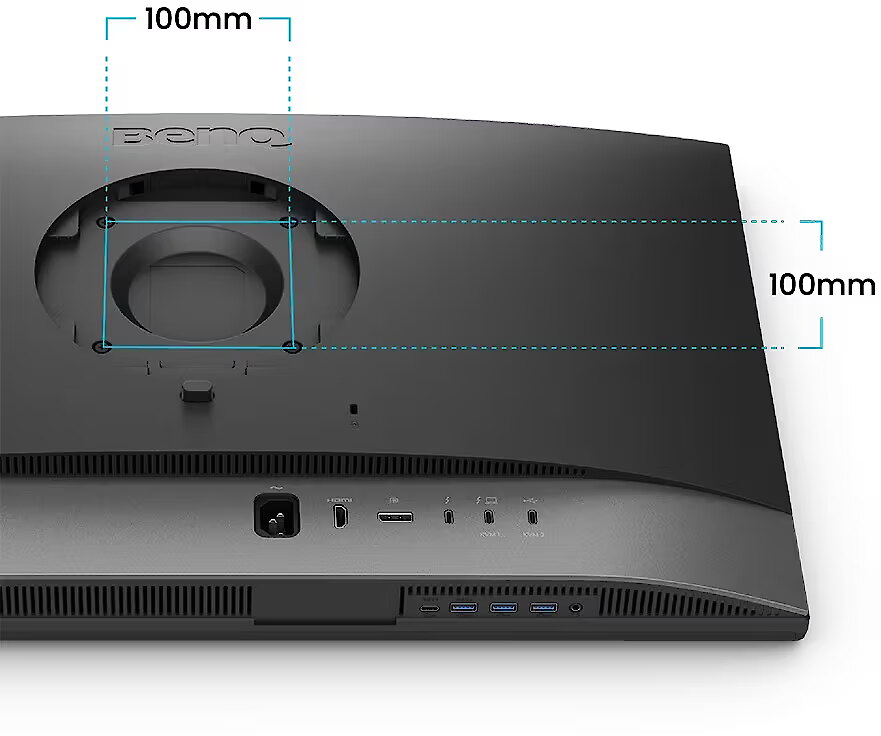
Dane fizyczne: Standard VESA - 100 x 100
Dane fizyczne: Szerokość - 614 mm
Dane fizyczne: Waga - 8.56 kg
Dane fizyczne: Wysokość - 429.97 mm
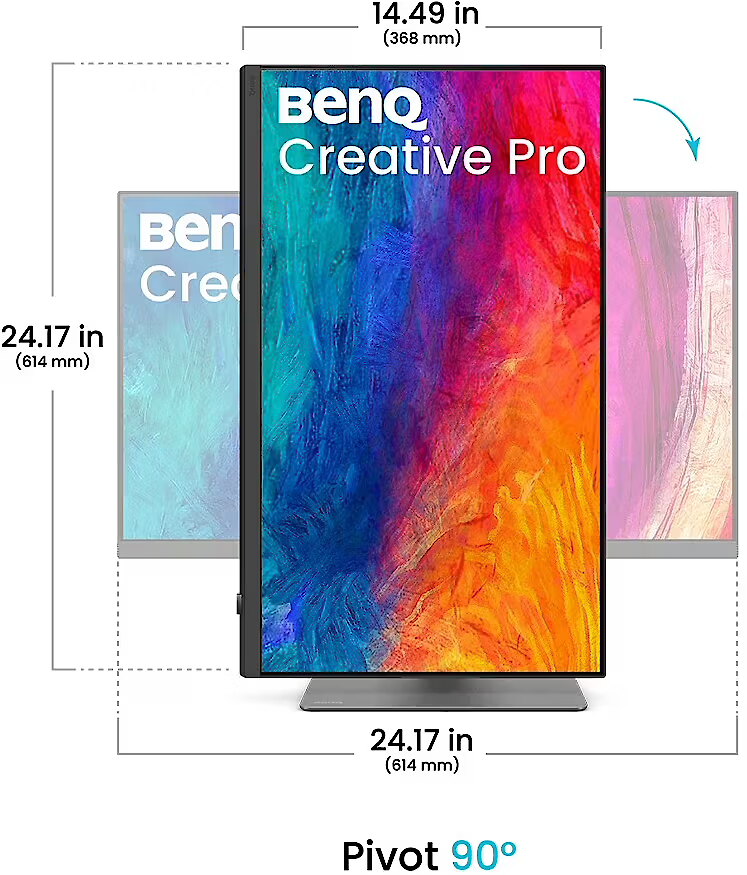
Dane fizyczne: Zakres obrotu (PIVOT) - 90 °
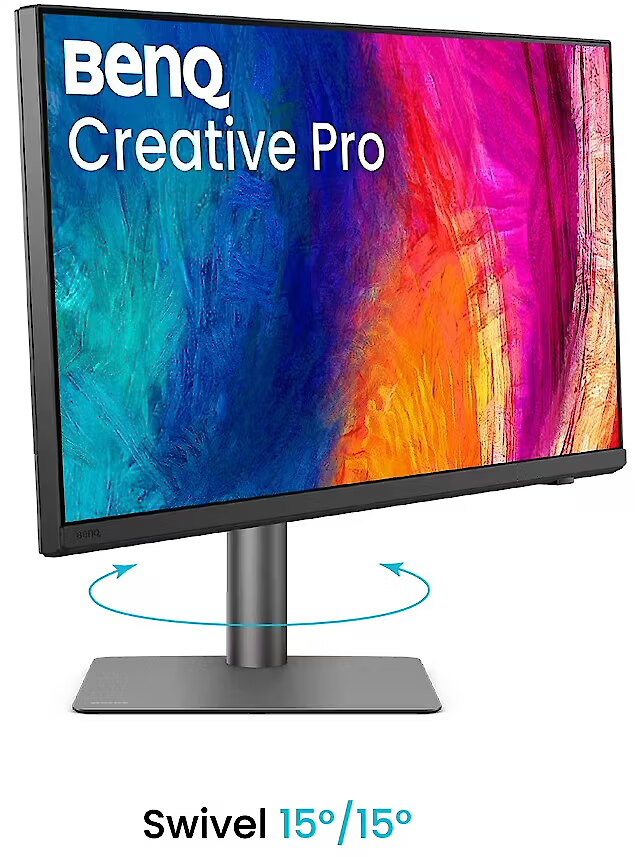
Dane fizyczne: Zakres regulacji obrotu (Swivel) - 30 °
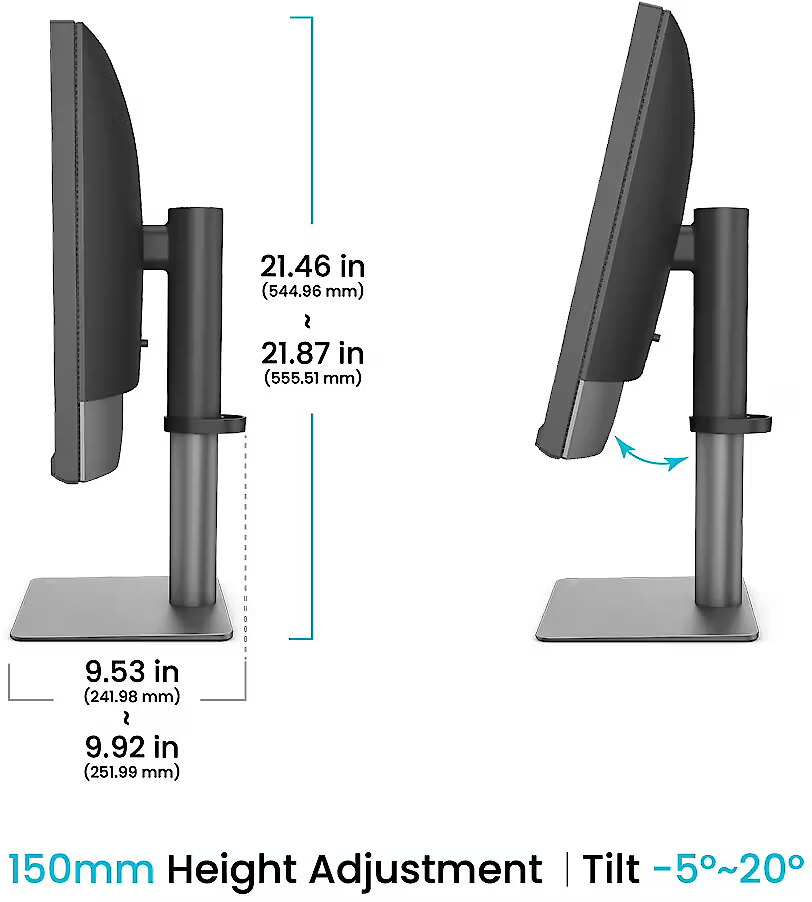
Dane fizyczne: Zakres regulacji pochylenia (Tilt) - 25 °
Dane fizyczne: Zakres regulacji wysokości (Height) - 115 mm
Dane techniczne: HDR - tak
Dane techniczne: Czas reakcji - 5 ms
Dane techniczne: Częstotliwość odświeżania - 60 Hz
Dane techniczne: Grupa produktowa - Monitory BenQ
Dane techniczne: Gwarancja - 3 lata w serwisie zewnętrznym
Dane techniczne: Jasność - 400 cd/m²
Dane techniczne: Model - BenQ PD32U
Dane techniczne: Możliwość regulacji - obrotowy ekran (pivot)
Dane techniczne: Możliwość regulacji - obrót na podstawie (swivel)
Dane techniczne: Możliwość regulacji - pochył
Dane techniczne: Możliwość regulacji - wysokość
Dane techniczne: Powłoka matrycy - antyrefleksyjna
Dane techniczne: Producent - BenQ
Dane techniczne: Przekątna - 27 cali
Dane techniczne: Rodzaj podświetlenia - LED
Dane techniczne: Rozdzielczość ekranu - 3840 x 2160 (4K Ultra HD) piksele
Dane techniczne: Standard portów wideo - DisplayPort 1.4
Dane techniczne: Standard portów wideo - HDMI 2.0
Dane techniczne: Standard portów wideo - Thunderbolt 4
Dane techniczne: Typ - do biura i domu
Dane techniczne: Typ ekranu - płaski
Dane techniczne: Typ matrycy - IPS
Data Act - Link
Depth - 82.94 mm
Depth with stand - 241.98 mm
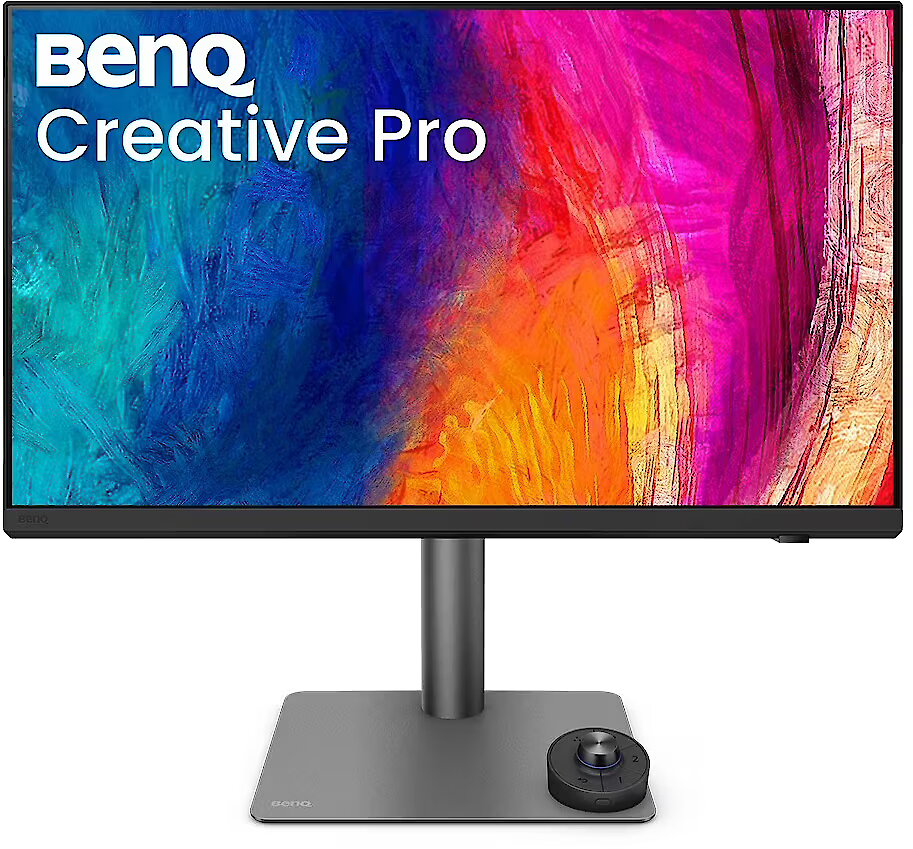
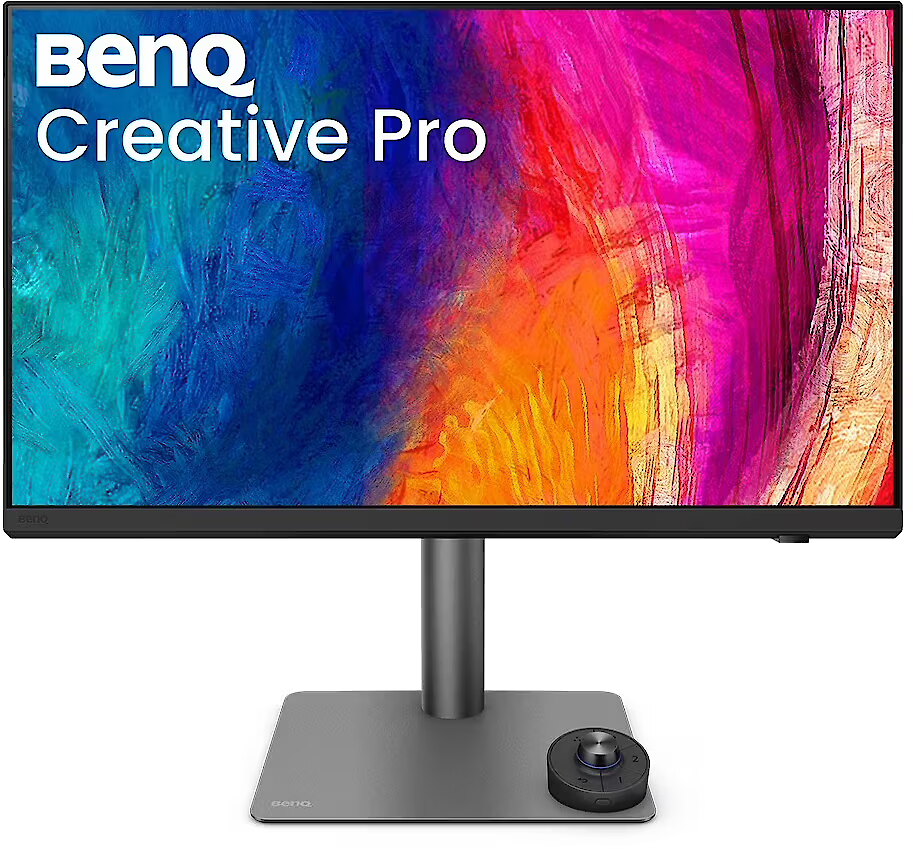
Description - BenQ Creative Pro PD2732U | 27" 4K Adobe RGB Monitor
Trusted Colors for Every Deliverable
Create with Confidence Across Every Deliverable Print-Ready Designs - Wide Adobe RGB preserves vibrant tones for photography, branding, and print-ready visuals Video-Ready Edits - Rec.709-aligned color assures accurate video editing Confidence Across Every Platform - Digital assets remain visually consistent across web, video, and social platforms Wider Color. Richer Detail. Adobe RGB.
Wider color coverage brings out richer greens, deeper blues, and more true-to-life detail, so what you see on the screen matches your final output, even in print.
A Wider Gamut for Professional Color Work
Today's creators work across web, video, and print in a single workflow. With up to 40% more color than sRGB, wider gamuts like Adobe RGB and Display P3 preserve accurate color across every deliverable.
Uniformity You Can Rely On
Uneven color and brightness can affect visual judgment, whether at the center or the edges of the screen can lead to misjudgment. BenQ uses full-panel global calibration to ensure consistent color and brightness across the entire display. This allows you to proof accurately and deliver without rework.
Always Accurate and Consistent Colors
Whether for print, photography, or design, the PD2732U maintains consistent on-screen coloreven across dual-monitor setups. Your canvas and reference remain perfectly aligned for seamless multi-device workflows.
Effortless, Steady Color Calibration
Intuitive calibration keeps your display accurate over time, providing a trusted visual reference for creative professionals.
*Software support for PD2732U will be available for Mac in late July and for Windows in early October. See the AQCOLOR Pilot page for details.
Preserve Color Accuracy, Visual Contrast, and Eye Comfort
Nano Matte Black Panel
Nano Matte Black Panel reduces reflections while maintaining contrast and tonal accuracy for deeper blacks, clear tonal separation, and comfortable viewing during long work sessions.
Corner-to-Corner Color Precision, From Panel to Production
BenQ's exclusive AQCOLOR technology delivers studio-grade color accuracy and consistency, trusted by professionals worldwide. Out-of-the-box Delta E2 color precision ensures that what you see on screen matches your intended output every time.
Certified by Third-Party Authorities
Pantone & Pantone SkinTone Validated and Calman Verified, the BenQ PD2732U ensures true-to-life color accuracy for real-world visuals, meeting the high standards creative professionals demand.
Professional Mac-Ready Workstation
A pro-grade, Mac-ready hub engineered for professional workflows that outperform standard Mac setups, ensuring deliverable-focused production.
All-in-One Connection
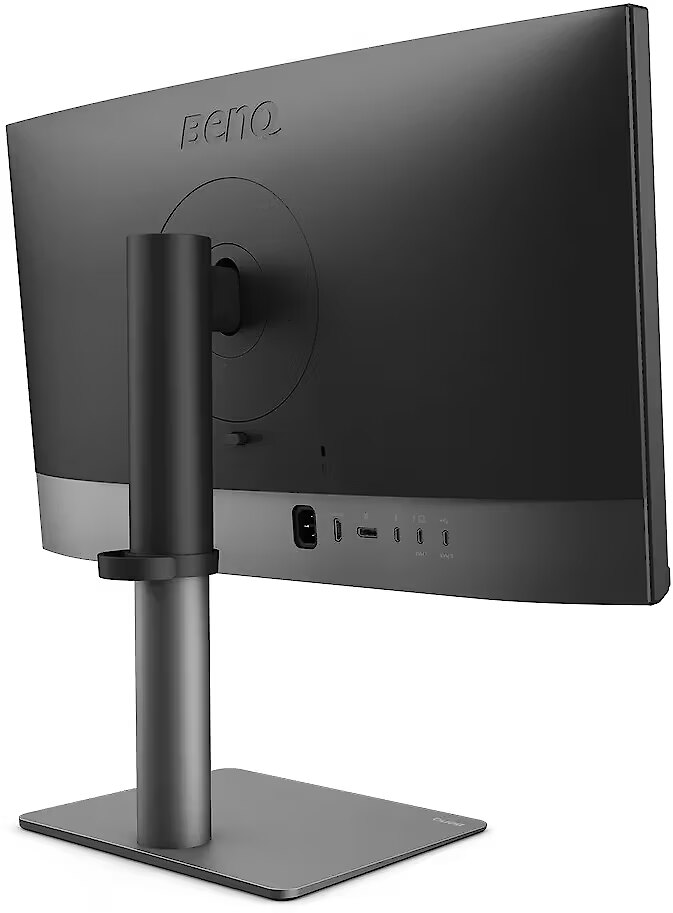
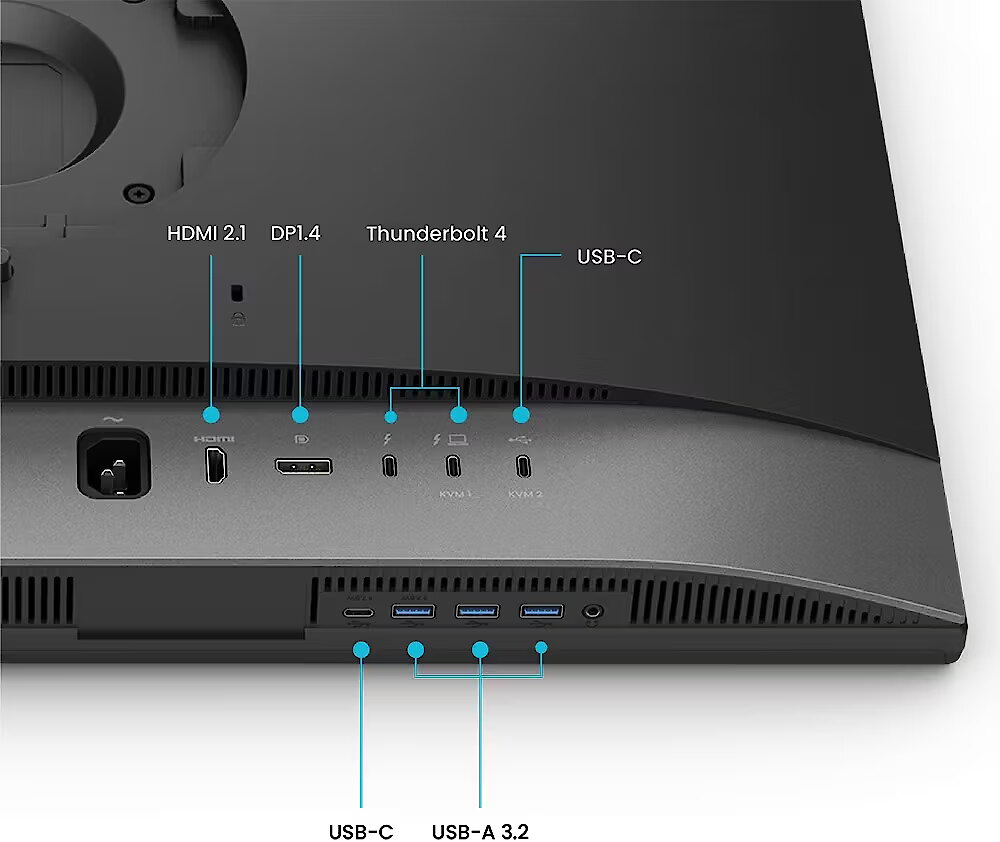
Thunderbolt 4 delivers up to 40Gbps data transfer and 90W power delivery through a single cable. Daisy chain support lets you easily connect dual monitors for a streamlined, clutter-free workspace.
*Thunderbolt 4 is fully compatible with USB-C.
Wireless Hotkey Puck
BenQ Hotkey Puck simplifies monitor control with Display Pilot 2 sync, allowing you to directly configure shortcut functions. It offers three customizable keys for quick access to Color Mode, Input, KVM, or app launch. The rotation dial provides precise control over brightness, contrast, and volume, no menus needed. Ideal for creatives, it helps you stay focused without interruptions.
Comfort That Keeps You Creating
Position your monitor for optimal comfort. With a variety of tilt, swivel, and pivot control points, whether youre working on design or presenting your ideas to clients, theres always the right spot and the right angle to do it.
Design - Feet colour - Black
Design - Market positioning - Professional
Design - Product colour - Black
Designation - CE+WEEE
dimension depth - 720 mm
dimension height - 560 mm
dimension weight - 13000 g
dimension width - 185 mm
Display - Colour gamut - 99%
Display - Colour gamut standard - Adobe RGB, DCI-P3, Rec. 709, sRGB
Display - Contrast ratio (typical) - 1000:1
Display - Display brightness (peak) - 400 cd/m²
Display - Display brightness (typical) - 400 cd/m²
Display - Display diagonal - 68.6 cm (27")
Display - Display diagonal (metric) - 68.58 cm
Display - Display number of colours - 1.07 billion colours
Display - Display resolution - 3840 x 2160 pixels
Display - Display technology - LED
Display - HD type - 4K Ultra HD
Display - High Dynamic Range (HDR) supported - Yes
Display - High Dynamic Range (HDR) technology - High Dynamic Range 10 (HDR10), Hybrid Log-Gamma (HLG)
Display - LED backlight - Yes
Display - Maximum refresh rate - 60 Hz
Display - Native aspect ratio - 16:9
Display - Panel type - IPS
Display - Pixel density - 163 ppi
Display - Response time - 5 ms
Display - Screen shape - Flat
Display - sRGB coverage (typical) - 100%
Display - Touchscreen - No
Display surface - Matt
Dodatkowe informacje o matrycy: Format obrazu - 16:9
Dodatkowe informacje o matrycy: Kontrast - 1000:1
Dodatkowe informacje o matrycy: Kąt widzenia w pionie - 178 °
Dodatkowe informacje o matrycy: Kąt widzenia w poziomie - 178 °
Dodatkowe informacje o matrycy: Liczba wyświetlanych kolorów - 1070 mln
ean - 4718755098215
EANCode - 4718755098215
Eans - 4718755098215
Efektywność energetyczna: Klasa energetyczna - G
Efektywność energetyczna: Klasa energetyczna w trybie HDR - G
Efektywność energetyczna: Zużycie energii - 40 kWh/1000h
Efektywność energetyczna: Zużycie energii w trybie HDR - 42 kWh/1000h
Energy class - G
Energy label - Pobierz
Ergonomics - Adjustable height (max) - 11.5 cm
Ergonomics - Height adjustment - Yes
Ergonomics - Number of OSD languages - 17
Ergonomics - On Screen Display (OSD) - Yes
Ergonomics - On Screen Display (OSD) languages - Bulgarian, Simplified Chinese, Traditional Chinese, Czech, German, English, French, Greek, Hungarian, Italian, Japanese, Korean, Dutch, Polish, Portuguese, Romanian, Russian, Spanish, Swedish, Ukrainian
Ergonomics - Panel mounting interface - 100 x 100 mm
Ergonomics - Pivot - Yes
Ergonomics - Pivot angle - 0 - 90°
Ergonomics - Swivel angle range - 15 - 15°
Ergonomics - Swivelling - Yes
Ergonomics - Tilt adjustment - Yes
Ergonomics - Tilt angle range - -5 - 20°
Ergonomics - VESA mounting - Yes
Ergonomics - Wall mountable - Yes
GRUPPE1 - Displays
GRUPPE2 - Lcd Monitor
GTIN - 0840046053420
GTIN - 840046053420
GTIN - 4718755098215
guarantee - 24
guarantee_type - external
Height - 368 mm
Height (max) - 544.96 mm
Height adjustment - Yes
Height adjustment range - 115 mm
Height with stand - 429.97 mm
HERSTELLER - BENQ
Hoehe - 0
HSTNUMMER - 9H.Y0MLA.TBE
I/O connectors - 1 x 3,5 mm minijack
I/O connectors - 1 x DisplayPort
I/O connectors - 1 x HDMI
I/O connectors - 2 x Thunderbolt 4
I/O connectors - 2 x USB 3.2 Type-C Gen 1
I/O connectors - 3 x USB 3.2 Type-A Gen 1
Informacje podstawowe: Standard HDR - HDR10
Kensington Security Slot - Nie
Laenge - 0
LongDesc - Adobe RGB for Digital-to-Print WorkflowsAdobe RGB for any Creative ProjectCreative professionals often work across graphic design, photography, print, and video within a single project. With Adobe RGB and 4K clarity, your work consistent and accurate across different mediums.When sRGB Isn’t EnoughWhat looks accurate on sRGB displays can change in print or production. Limited color coverage clips blues and greens while flattening subtle gradients. Originally designed for digital previews, sRGB simply wasn’t built for professional work.A Wider Gamut for Professional Color WorkToday’s creators work across web, video, and print in a single workflow. With up to 40% more color than sRGB, wider gamuts like Adobe RGB and Display P3 preserve accurate color across every deliverable.Uniformity You Can Rely OnUneven color and brightness, whether at the center or the edges of the screen, can affect your visual judgement of your work. BenQ uses full-panel global calibration to ensure consistent color and brightness across the entire display. This allows you to check your projects accurately and deliver without reworks.Professional Mac-Ready WorkstationA pro-grade, Mac-ready hub engineered for professional workflows that outperform standard Mac setups, ensuring deliverable-focused production.Thunderbolt 4All-in-One ConnectionThunderbolt 4 transmits images, video, and data at up to 40Gbps while delivering 90W of power through a single cable.*Thunderbolt 4 is fully compatible with USB-C.Daisy ChainBoost Your Workflow with Two MonitorsDaisy chain extends to dual 4K monitors, streamlining complex workflows with smoother multitasking, precise rendering, and enhanced productivity.*Since Apple Silicon M1 and M2 chips do not support multiple monitors natively, Daisy Chain is only applicable on Pro, Max, and Ultra-based devices, not on base M1 and M2 models.iKeyboard ControlOn macOS, operate your MacBook and monitor together as if they were a single system. Press the brightness or volume key once, and both screens adjust in sync.*Mac®, MacBook®, iPhone® and iPad® are trademarks of Apple Inc.Always Accurate and Consistent ColorsWhether for print, photography, or design, the PD2732U maintains consistent on-screen color—even across dual-monitor setups. Your canvas and reference remain perfectly aligned for seamless multi-device workflows.Corner-to-Corner Color Precision, From Panel to ProductionBenQ’s exclusive AQCOLOR technology delivers studio-grade color accuracy and consistency, trusted by professionals worldwide. Out-of-the-box Delta E≤2 color precision ensures that what you see on screen matches your intended output every time.Certified by Third-Party AuthoritiesPantone & Pantone SkinTone Validated and Calman Verified, the BenQ PD2732U ensures true-to-life color accuracy for real-world visuals, meeting the high standards creative professionals demand.AQCOLOR PilotEffortless Color CalibrationCalibrate your monitor with ease with BenQ's free AQCOLOR Pilot software. Intuitive calibration keeps your display accurate over time, providing a trusted visual reference for creative professionals. *Software support for PD2732U will be available for Mac in late July and for Windows in early October. See the AQCOLOR Pilot page for details.Nano Matte Black PanelPreserve Color Accuracy, Visual Contrast, and Eye ComfortNano Matte Black Panel reduces reflections while maintaining contrast and tonal accuracy for deeper blacks, clear tonal separation, and comfortable viewing during long work sessions.BenQ Display Pilot 2Have full control of your display with BenQ's free Display Pilot 2 software. The customizable interface allows you to organize functions such as ICCsync, Color Modes, and Desktop Partition. Have full control of your display and work the way you want to.Wireless Hotkey PuckBenQ Hotkey Puck simplifies monitor control with Display Pilot 2 sync, allowing you to directly configure shortcut functions. It offers three customizable keys for quick access to Color Mode, Input, KVM, or app launch. The rotation dial provides precise control over brightness, contrast, and volume, no menus needed. Ideal for creatives, it helps you stay focused without interruptions.Built-in KVMSeamless Mac® & PC ControlCompatible with Mac and PC, the built-in KVM switch enables effortless control of dual systems with one keyboard and mouse, streamlining cross-platform review and delivery without clutter or interruption.Comfort That Keeps You CreatingPosition your monitor for optimal comfort with the built-in ergonomic stand. With a variety of tilt, swivel, and pivot control points, whether you’re working on design or presenting your ideas to clients, there’s always the right spot and the right angle to do it.Trusted Colors for Every DeliverableProfessional monitors designed for precision and reliability across all creative workflows
LongProductName - 27" 4K Adobe RGB Monitor for Graphic Design & Cross-Media Workflows
LongSummaryDescription - BenQ PD2732U. Display diagonal: 68.6 cm (27"), Display resolution: 3840 x 2160 pixels, HD type: 4K Ultra HD, Display technology: LED, Response time: 5 ms, Native aspect ratio: 16:9. Built-in USB hub. VESA mounting, Height adjustment. Product colour: Black
Matrix type - TFT IPS
Microphone - Nie
Model - PD2732U
Multimedia - Built-in speaker(s) - No
Name - BenQ PD2732U - 60Hz | 4K | 27'' | IPS | 5ms
name - Monitor 27 inches PD2732U LED 4K IPS/60Hz/5ms
Number of colors - 1,07 mld
Ochrona oczu: Filtr światła niebieskiego - tak
Ochrona oczu: Redukcja migotania - tak
Packaging content - Cables included - Thunderbolt, USB
Packaging content - Quick start guide - Yes
Performance - Flicker-free technology - Yes
Performance - Smart modes - Animation
Ports & interfaces - Built-in USB hub - Yes
Ports & interfaces - DisplayPorts quantity - 1
Ports & interfaces - DisplayPort version - 1.4
Ports & interfaces - HDCP - Yes
Ports & interfaces - HDCP version - 2.2
Ports & interfaces - HDMI - Yes
Ports & interfaces - HDMI ports quantity - 1
Ports & interfaces - HDMI version - 2.0
Ports & interfaces - Headphone out - Yes
Ports & interfaces - Headphone outputs - 1
Ports & interfaces - USB Power Delivery (USB PD) - Yes
Ports & interfaces - USB Power Delivery up to - 90 W
Ports & interfaces - USB Type-A downstream ports quantity - 2
Ports & interfaces - USB Type-C DisplayPort Alternate Mode - Yes
Ports & interfaces - USB Type-C downstream ports quantity - 1
Power - AC input voltage - 100 - 240 V
Power - Energy consumption (HDR) per 1000 hours - 42 kWh
Power - Energy consumption (SDR) per 1000 hours - 40 kWh
Power - Energy efficiency class (HDR) - G
Power - Energy efficiency class (SDR) - G
Power - Power consumption (max) - 200 W
Power - Power consumption (typical) - 42 W
Power - Power supply type - Internal
Power consumption - 200 W
Pozostałe cechy: Akcesoria - kabel Thunderbolt
Pozostałe cechy: Akcesoria - kabel USB
Pozostałe cechy: Dodatkowe informacje - Sterownik Hotkey Puck G3 | Pantone Validated | Pantone SkinTone™ Validated | Display Pilot 2 | Display ColorTalk | Display Quickit
Producent: Nazwa producenta / importera - BenQ
BenQ Europe B.V.
Meerenakkerweg
1-17, 5652 AR Eindhoven, The Netherlands producer - Benq
Producer - BenQ
ProducerCode - 9H.Y0MLA.TBE
ProductName - PD2732U
Refresh rate - 0 Hz
Resolution - 3840 x 2160
Response time - 5 ms
Screen size (diag.) - 27"
ShortDescription - 27'' | IPS | 4K | 5ms | 60Hz
ShortSummaryDescription - BenQ PD2732U, 68.6 cm (27"), 3840 x 2160 pixels, 4K Ultra HD, LED, 5 ms, Black
Speakers built-in - No
Static contrast - 1 000:1
Stck_Kart - 1
Stck_Pal - 2
Storno - Y
Swivel - Yes
Tilt - Yes
Title - BenQ PD2732U
Touch screen - No
Transreflective technology - LED
TV tuner built-in - No
URL - https://www.benq.eu/en-uk/monitor/creative-pro/pd2732u.html
vendpn - 9H.Y0MLA.TBE
VESA - 100 x 100
WarrantyInfo -
Web camera - None
Weight - 5.89 kg
Weight & dimensions - Depth (without stand) - 82.9 mm
Weight & dimensions - Depth (with stand) - 242 mm
Weight & dimensions - Height (without stand) - 368 mm
Weight & dimensions - Height (with stand) - 689.4 mm
Weight & dimensions - Weight (without stand) - 5.89 kg
Weight & dimensions - Weight (with stand) - 8.56 kg
Weight & dimensions - Width (without stand) - 614 mm
Weight & dimensions - Width (with stand) - 368 mm
Weight with stand - 8.56 kg
Width - 614 mm
WiFi - No
Złącza: Złącza - 1 x DisplayPort
Złącza: Złącza - 1 x HDMI 2.0
Złącza: Złącza - 2 x ThunderBolt
Złącza: Złącza - 2 x USB Type-C
Złącza: Złącza - 3 x USB 3.2 Gen 1 Type A




 DVI is a digital standard and ensures high image quality, however, thanks to the big size of the plug and the inability of the standard to develop further due to a few technical restrictions this type of connection is gradually losing its popularity to modern HDMI and DisplayPort standards.