ACinputfrequency - 50/60 Hz
ACinputvoltage - 100 - 240 V
Adjustableheightmax - 15.5 cm
AMDFreeSync - No
Antiglarescreen - Yes
ARTIKEL1 - P24QD-40 23.8 2K QHD IPS 16:9
ARTIKEL2 - 300CD/M L/T/P/S ENET USB-C
Aspectratio -
Aspect ratio - 16:9
Audioinput -
Audiooutput -
Backlighttype - W-LED
Brand - Lenovo
BrandPartCode - 64B1GAT1EU
Breite - 0
Built-in camera - No
Built-in speakers - Yes
Builtincamera - No
BuiltinKVMswitch - Yes
Builtinmicrophone - No
Builtinspeakers - No
BuiltinUSBhub - Yes
Bundledsoftware -
Cablelockslot - Yes
Cablesincluded - DisplayPort, Power, USB Type-A to USB Type-B, USB Type-C to USB Type-C
Category - Computer Monitors
Charging power, W - 140
Code - 64B1GAT1EU
Colourdepth - 8 bit
Colourgamut - 99%
Colourgamutstandard - Rec. 709
Connections - DisplayPort
Connections - Ethernet (RJ-45)
Connections - HDMI
Connections - USB-A
Connections - USB-B
Connections - USB-C
Contrast ratio (typical) - 1500:1
Contrastratiodynamic - 3000000:1
Contrastratiotypical - 1500:1
Curved - No
Depthwithoutstand - 45.3 mm
Depthwithstand - 190 mm
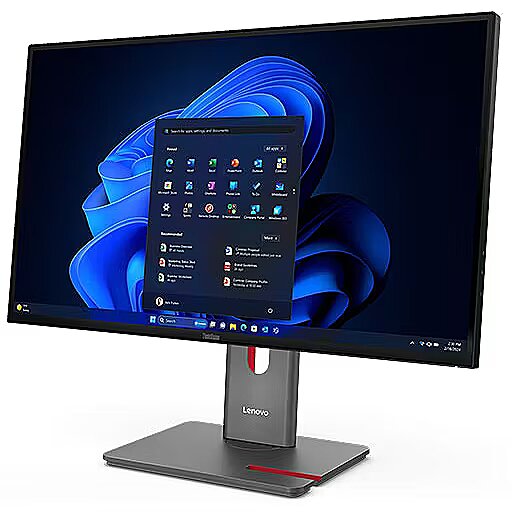
Description - LENOVO 23.8" P24QD-40 QHD IPS 16:9 120HZ DP/HDMI/USB-C(140W)/RJ45
Design -
Design - Colour name - Eclipse Black
Design - Detachable stand - Yes
Design - Feet colour - Black
Design - Front bezel colour - Black
Design - Product colour - Black
Design > Colour of product - Eclipse Black
Detachablestand - Yes
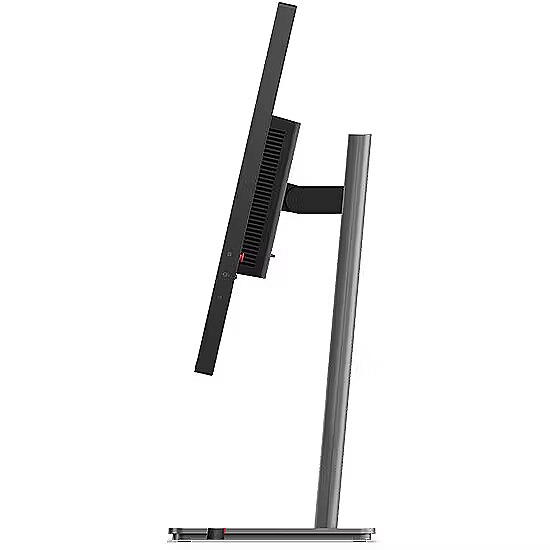
Dimensions (W x D x H) with stand, mm - 539.8 x 190.0 x 350.8 - 505.8
Dimensions W x D x H, mm - 539.8 x 45.3 x 315.8
Display -
Display - Anti-glare screen - Yes
Display - Backlight type - W-LED
Display - Colour depth - 8 bit
Display - Colour gamut - 99%
Display - Colour gamut standard - Rec. 709
Display - Contrast ratio (dynamic) - 3000000:1
Display - Contrast ratio (typical) - 1500:1
Display - Display brightness (typical) - 300 cd/m²
Display - Display diagonal - 60.5 cm (23.8")
Display - Display diagonal (metric) - 60.5 cm
Display - Display number of colours - 16.7 million colours
Display - Display resolution - 2560 x 1440 pixels
Display - Display technology - LCD
Display - HD type - Quad HD
Display - High Dynamic Range (HDR) supported - Yes
Display - High Dynamic Range (HDR) technology - High Dynamic Range 10 (HDR10)
Display - LED backlight - Yes
Display - Maximum refresh rate - 120 Hz
Display - Native aspect ratio - 16:9
Display - Panel type - IPS
Display - Pixel density - 123 ppi
Display - Pixel pitch - 0.2058 x 0.2058 mm
Display - Response time - 6 ms
Display - Response time (fast) - 4 ms
Display - Response time measurement type - GTG (Gray to Gray)
Display - Screen shape - Flat
Display - sRGB coverage (typical) - 99%
Display - Touchscreen - No
Display - Viewable size, vertical - 52.7 cm
Display - Viewable size diagonal - 29.6 cm
Display - Viewing angle, horizontal - 178°
Display - Viewing angle, vertical - 178°
Display > Aspect ratio - 16:9
Display > Backlight type - WLED
Display > Display - 2560 x 1440 pixels
Display > Display brightness - 300 cd/m²
Display > Display diagonal - 23.8 "
Display > Display number of colours - 16.7 M
Display > Display surface - Anti-Glare
Display > Maximum refresh rate - 120 Hz
Display > Panel type - IPS
Display > Response time - 6 ms
Display > Viewing angle, horizontal - 178 °
Display > Viewing angle, vertical - 178 °
Displaybezeltechnology -
Display brightness, cd/m² - 300
Displaybrightnesstypical - 300 cd/m²
Display color - Black
Displaydiagonal - 60.5 cm (23.8")
Display diagonal, " - 23.8
Displaydiagonalmetric - 60.5 cm
Display number of colours - 16.7 M
Displaynumberofcolours - 16.7 million colours
DisplayPortoutquantity - 1
DisplayPortoutversion - 1.4
DisplayPortsquantity - 2
DisplayPorts quantity - 2
DisplayPortversion - 1.4
Displayresolution - 2560 x 1440 pixels
Display resolution, pixels - 2560 x 1440
Displaysurface -
Displaytechnology - LCD
EAN - 198156544872
EANCode - 0198156544872
EnergyconsumptionSDRper1000hou - 14 kWh
EnergyefficiencyclassHDR - F
EnergyefficiencyclassSDR - D
Energyefficiencyscale - A to G
Ergonomics -
Ergonomics - Adjustable height (max) - 15.5 cm
Ergonomics - Cable lock slot - Yes
Ergonomics - Cable lock slot type - Kensington
Ergonomics - Height adjustment - Yes
Ergonomics - Panel mounting interface - 100 x 100 mm
Ergonomics - Pivot - Yes
Ergonomics - Pivot angle - -90 - 90°
Ergonomics - Plug and Play - Yes
Ergonomics - Swivel angle range - -45 - 45°
Ergonomics - Swivelling - Yes
Ergonomics - Tilt adjustment - Yes
Ergonomics - Tilt angle range - -5 - 23.5°
Ergonomics - VESA mounting - Yes
Ergonomics > Height adjustment - Yes
Ergonomics > Pivot - Yes
Ergonomics > Swivelling - Yes
Ergonomics > Tilt adjustment - Yes
Ergonomics > VESA mounting - Yes
Ergonomics > VESA mounting interfaces - 100x100 mm
EthernetLAN - Yes
Ethernet LAN (RJ-45) ports quantity - 1
Fastcharging -
Feetcolour - Black
Flickerfreetechnology -
Gewicht - 8.26
Glossy display - No
Green certifications - Energy Star
Green certifications - TCO 10.0
Green certifications - TCO Edge 2.1
GRUPPE1 - Displays
GRUPPE2 - Lcd Monitor
GTIN - 198156544872
GTIN - 0198156544872
Hazerate -
HDCP -
HDMI - Yes
HDMIportsquantity - 1
HDMI ports quantity - 1
HDMIversion - 2.1
HDtype - Quad HD
Headphoneconnectivity -
Headphoneout - No
Headphoneoutputs -
Height - 420.000000
Heightadjustment - Yes
Height adjustment - Yes
Height adjustment, mm - 155
Heightwithoutstand - 315.8 mm
Heightwithstand - 505.8 mm
HERSTELLER - LENOVO
HighLights -
Hoehe - 0
Horizontalscanrange -
HSTNUMMER - 64B1GAT1EU
InfraredIRsensor -
Laenge - 0
LEDbacklight - Yes
Length - 730.000000
Link - https://psref.lenovo.com/Detail/ThinkVision_P24QD_40?M=64B1GAT1EU
LongDesc -
LongProductName - 23.8", 2560 x 1440 WLED IPS, 120Hz, 16:9, 300cd/m², 4ms, 178° / 178°, USB PD (140W)
LongSummaryDescription - Lenovo ThinkVision P24QD-40 Monitor. Display diagonal: 60.5 cm (23.8"), Display resolution: 2560 x 1440 pixels, HD type: Quad HD, Display technology: LCD, Response time: 6 ms, Native aspect ratio: 16:9, Viewing angle, horizontal: 178°, Viewing angle, vertical: 178°. Built-in USB hub. VESA mounting, Height adjustment. Product colour: Black
LowBlueLighttechnology - Yes
Manufacturer - Lenovo
Manufacturer's estimate: Product life cycle used in emission assessments, years - 4
Manufacturer?s estimate: Manufacturing-related CO2 emissions, kg - 306
Manufacturer?s estimate: Product life cycle CO2 emissions, kg - 400
ManufacturerPartNumber - 64B1GAT1EU
ManufDatasheet - https://www.tdbaltic.ee/leaflets/LENOVO/64B1GAT1EU.pdf
Marketpositioning -
Maximumrefreshrate - 120 Hz
Megapixelapprox -
Multimedia -
Multimedia - Built-in camera - No
Multimedia - Built-in microphone - No
Multimedia - Built-in speaker(s) - No
Multimedia > Built-in speaker(s) - No
Multimedia > TV tuner integrated - No
Name - Lenovo | ThinkVision P24QD-40 | 23.8 " | IPS | 16:9 | 120 Hz | 6 ms | 2560 x 1440 pixels | 300 cd/m² | HDMI ports quantity 1 | Eclipse Black | Warranty 36 month(s)
Nativeaspectratio - 16:9
Network -
Network - Ethernet LAN - Yes
Networking > Ethernet LAN (RJ-45) ports - Yes
Numberofspeakers -
NumberofUSBTypeBupstreamportsq - 1
NVIDIAGSYNC - No
OnScreenDisplayOSD -
OperatingrelativehumidityHH - 10 - 80%
OperatingtemperatureTT - 0 - 40 °C
Operationalconditions -
Operational conditions - Operating relative humidity (H-H) - 10 - 80%
Operational conditions - Operating temperature (T-T) - 0 - 40 °C
Operational conditions - Storage relative humidity (H-H) - 5 - 95%
Operational conditions - Storage temperature (T-T) - -20 - 60 °C
Other features - Certification - ENERGY STAR Certified,TCO 10.0, TCO Edge 2.1, EU Energy Efficiency Level (Level-D), EPEAT Gold
TÜV Rheinland Eye Comfort 5 Stars, Eyesafe Display 2.0, TÜV Low Blue Light (Hardware solution)
Other features - Ethernet LAN (RJ-45) ports - 1
Other features - Ethernet LAN data rates - 2500 Mbit/s
Packagedepth - 123 mm
Package features > Embeeded battery - No
Package features > Gross depth (mm) - 734.00 mm
Package features > Gross height (mm) - 422.00 mm
Package features > Gross width (mm) - 112.00 mm
Package features > Packing quantity - 1.00 pc(s)
Package features > Palette Qty - 50 pc(s)
Package features > Paper/Pasteboard - 2000.00 g
Package features > Plastic (No PET) - 800.00 g
Package features > Tare weight (kg) - 2.80 kg
Package features > Volume (m3) - 0.03 m³
Package features > WEE classification - CL109:2:2017-04-01
Package features > WEEE tax - Yes
Packageheight - 420 mm
Packagetype - Box
Packageweight - 8.4 kg
Packagewidth - 730 mm
Packagingcontent -
Packaging content - Cables included - DisplayPort, Power, USB Type-A to USB Type-B, USB Type-C to USB Type-C
Packaging content - DisplayPort cable length - 1.8 m
Packaging content - Power cable length - 1.8 m
Packaging content - Quick start guide - Yes
Packaging content - Stand included - Yes
Packagingdata -
Packaging data - Package depth - 123 mm
Packaging data - Package height - 420 mm
Packaging data - Package type - Box
Packaging data - Package weight - 8.4 kg
Packaging data - Package width - 730 mm
Panelmountinginterface - 100 x 100 mm
Paneltype - IPS
Panel type - IPS
PDF - https://www.blobs.lt/products/0/1/4/1/7/4/f88efd43fd71086d7a744b5a9017a489/original.pdf
Performance -
Performance - AMD FreeSync - No
Performance - Low Blue Light technology - Yes
Performance - NVIDIA G-SYNC - No
Performance - Windows operating systems supported - Windows 10, Windows 11
PeriodofWarranty - 36 M
Pivot - Yes
Pivotangle - -90 - 90°
Pixeldensity - 123 ppi
Pixelpitch - 0.2058 x 0.2058 mm
Ports & interfaces - Built-in KVM switch - Yes
Ports & interfaces - Built-in USB hub - Yes
Ports & interfaces - DisplayPort out quantity - 1
Ports & interfaces - DisplayPort out version - 1.4
Ports & interfaces - DisplayPorts quantity - 2
Ports & interfaces - DisplayPort version - 1.4
Ports & interfaces - HDMI - Yes
Ports & interfaces - HDMI ports quantity - 1
Ports & interfaces - HDMI version - 2.1
Ports & interfaces - Headphone out - No
Ports & interfaces - Number of upstream ports - 2
Ports & interfaces - Number of USB Type-B upstream ports quantity - 1
Ports & interfaces - Number of USB Type-C upstream ports quantity - 1
Ports & interfaces - USB Power Delivery (USB PD) - Yes
Ports & interfaces - USB Power Delivery up to - 140 W
Ports & interfaces - USB Type-A downstream ports quantity - 4
Ports & interfaces - USB Type-C DisplayPort Alternate Mode - Yes
Ports & interfaces - USB Type-C downstream ports quantity - 1
Ports & interfaces - USB upstream port type - USB Type-B, USB Type-C
Ports & interfaces > DisplayPorts quantity - 2
Ports & interfaces > HDMI ports quantity - 1
Portsinterfaces -
Power -
Power - AC input frequency - 50/60 Hz
Power - AC input voltage - 100 - 240 V
Power - Energy consumption (HDR) per 1000 hours - 22 kWh
Power - Energy consumption (SDR) per 1000 hours - 14 kWh
Power - Energy efficiency class (HDR) - F
Power - Energy efficiency class (SDR) - D
Power - Energy efficiency scale - A to G
Power - Power consumption (max) - 210 W
Power - Power consumption (off) - 0.3 W
Power - Power consumption (standby) - 0.5 W
Power - Power consumption (typical) - 16.5 W
Power - Power supply type - Internal
Power consumption (max.), W - 210
Power consumption, W - 16.5
Powerconsumptionmax - 210 W
Powerconsumptionoff - 0.3 W
Powerconsumptionstandby - 0.5 W
Powerconsumptiontypical - 16.5 W
Powersupplytype - Internal
ProdDesc - Lenovo ThinkVision P24qd-40 - QHD
Productcolour - Black
Productcondition - Original
ProductHighLights -
- 23.8" WLED IPS
- Wide Quad HD, 16:9, 2560 x 1440
- 120Hz, 4ms, 300cd/m²
- USB Hub, USB PD (140W)
ProductName - ThinkVision P24QD-40 Monitor
ProductPicture - https://www.tdbaltic.ee/images/products/LENOVO/64B1GAT1EU_1.jpg
ProductPicture1 - https://www.tdbaltic.ee/images/products/LENOVO/64B1GAT1EU_2.jpg
ProductPicture2 - https://www.tdbaltic.ee/images/products/LENOVO/64B1GAT1EU_3.jpg
ProductPicture3 - https://www.tdbaltic.ee/images/products/LENOVO/64B1GAT1EU_4.jpg
ProductPicture4 - https://www.tdbaltic.ee/images/products/LENOVO/64B1GAT1EU_5.jpg
ProductPicture5 - https://www.tdbaltic.ee/images/products/LENOVO/64B1GAT1EU_6.jpg
ProductPicture6 - https://www.tdbaltic.ee/images/products/LENOVO/64B1GAT1EU_7.jpg
ProductPicture7 - https://www.tdbaltic.ee/images/products/LENOVO/64B1GAT1EU_8.jpg
ProductPicture8 - https://www.tdbaltic.ee/images/products/LENOVO/64B1GAT1EU_9.jpg
Quickstartguide - Yes
Refresh rate, Hz - 120
Remotelyoperated -
Responsetime - 6 ms
Response time, ms - 4
Responsetimefast - 4 ms
Responsetimemeasurementtype - GTG (Gray to Gray)
RMSratedpower -
Screenshape - Flat
ShortSummaryDescription - Lenovo ThinkVision P24QD-40 Monitor, 60.5 cm (23.8"), 2560 x 1440 pixels, Quad HD, LCD, 6 ms, Black
SRGBcoveragetypical - 99%
Stck_Kart - 1
Stck_Pal - 35
StoragerelativehumidityHH - 5 - 95%
Storno - Y
Supportedgraphicsresolutions -
Surfacehardness -
Swivelanglerange - -45 - 45°
Swivelling - Yes
Technical details > Connectivity - HDMI, DisplayPort, USB-C, USB-B, USB-A, RJ45
Technical details > Gross weight - 10.10 kg
Technical details > Net weight - 7.30 kg
Technical details > Producer - Lenovo
Technical details > Producer product name - ThinkVision P24QD-40
Technical details > USB-C - Yes
Technical details > USB-C power delivery - 140W
Tiltadjustment - Yes
Tilt angle, ° - -5 - +23.5
Tiltanglerange - -5 - 23.5°
Title - Lenovo ThinkVision P24QD-40 Monitor
Touchscreen - No
Touch sensitive screen - No
Turn, ° - -45 - +45
URL - https://www.lenovo.com/
USB-C charging power max, W - 140
USB-C charging power min, W - 15
USB-C power delivery - Yes
USBhubversion -
USBPowerDeliveryUSBPD - Yes
USB Type-C ports quantity - 2
USBTypeAdownstreamportsquantit - 4
USBTypeCDisplayPortAlternateMo - Yes
Verticalscanrange -
VESA-standard, mm - 100 x 100
VESAmounting - Yes
Viewablesizediagonal - 29.6 cm
Viewablesizehorizontal -
Viewablesizevertical - 52.7 cm
Viewing angle, horizontal, ° - 178
Viewing angle, vertical, ° - 178
Viewinganglehorizontal - 178°
Viewinganglevertical - 178°
Warranty - 12 months
Warranty - 36
Warranty - 36 month(s)
Warrantyandmisc -
WarrantyInfo - 3-year
Weight - 8.250000
Weight & dimensions - Bezel width (bottom) - 1.15 cm
Weight & dimensions - Bezel width (side) - 2 mm
Weight & dimensions - Bezel width (top) - 2 mm
Weight & dimensions - Depth (without stand) - 45.3 mm
Weight & dimensions - Depth (with stand) - 190 mm
Weight & dimensions - Height (without stand) - 315.8 mm
Weight & dimensions - Height (with stand) - 505.8 mm
Weight & dimensions - Weight (without stand) - 3.6 kg
Weight & dimensions - Weight (with stand) - 5.6 kg
Weight & dimensions - Width (without stand) - 539.8 mm
Weight & dimensions - Width (with stand) - 539.8 mm
Weight, g - 3600
Weightdimensions -
Weightwithoutstand - 3.6 kg
Weightwithstand - 5.6 kg
Weight with stand, g - 5600
Width - 120.000000
Widthwithoutstand - 539.8 mm
Widthwithstand - 539.8 mm






 DVI is a digital standard and ensures high image quality, however, thanks to the big size of the plug and the inability of the standard to develop further due to a few technical restrictions this type of connection is gradually losing its popularity to modern HDMI and DisplayPort standards.




