AC input frequency Power - 50/60 Hz
AC input voltage Power - 100 - 240 V
Adjustable height (max) Ergonomics - 15 cm
AMD FreeSync Performance - No
Anti-glare screen Display - Yes
Brand - LG
BrandPartCode - 27BA54QB-B
Brand specific technologies Other features - Black Stabilizer, Super+ Resolution
Built-in camera Multimedia - No
Built-in KVM switch Ports & interfaces - Yes
Built-in speaker(s) Multimedia - Yes
Built-in USB hub Ports & interfaces - Yes
Cable lock slot Ergonomics - Yes
Cable lock slot type Ergonomics - Kensington
Cables included Packaging content - AC, DisplayPort
Category - Computer Monitors
Category Code - LC3
Code - 27BA54QB-B.AEU
Colour depth Display - 8 bit
Colour gamut standard Display - sRGB
Contrast ratio (typical) Display - 1000:1
Data Sheet (Link) Energy Efficiency - https://eprel.ec.europa.eu/api/product/2224735/fiches?language=EN
Depth (without stand) Weight & dimensions - 63 mm
Depth (with stand) Weight & dimensions - 250 mm
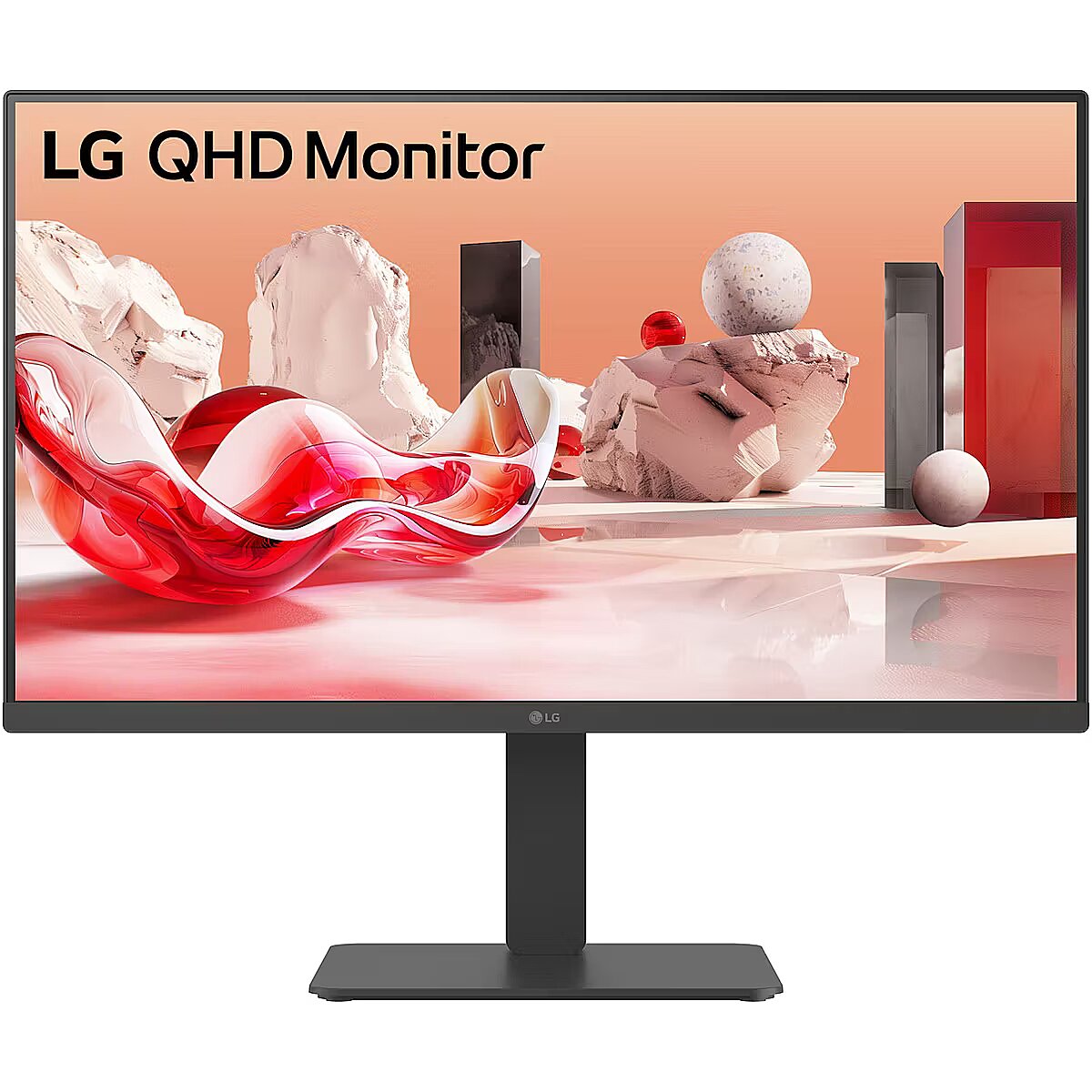
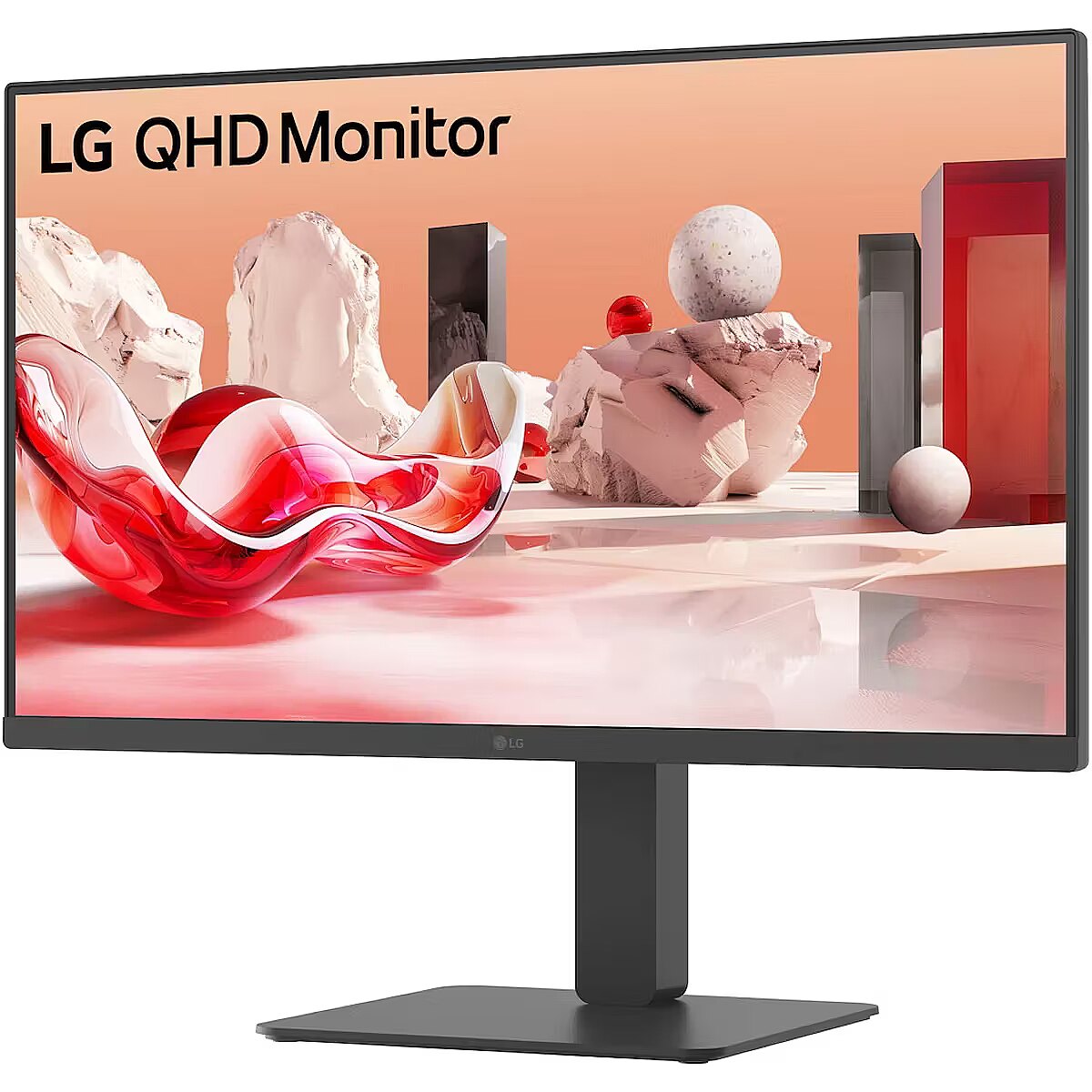
Description - 27” QHD IPS display
Vivid color at wide angles
LG QHD (2560 x 1440) monitor with IPS technology delivers a clear and consistent color. It can provide vivid color reproduction and help users to view the screen at a wide angle. Versatile business monitors for various workspace
This versatile monitor can cover various works at many places, such as offices, public institutions, hospitals, and customer service, with a clear IPS display and 3-side virtually borderless design. HDR10 with sRGB 99% (Typ.)
See amazing colors
HDR technology is now applied to various content. This monitor is compatible with industry standard HDR10 (High Dynamic Range), based on the sRGB 99% color gamut, supporting specific levels of color and brightness that enables viewers to enjoy the dramatic colors of the content. Multi ports
A variety of interface
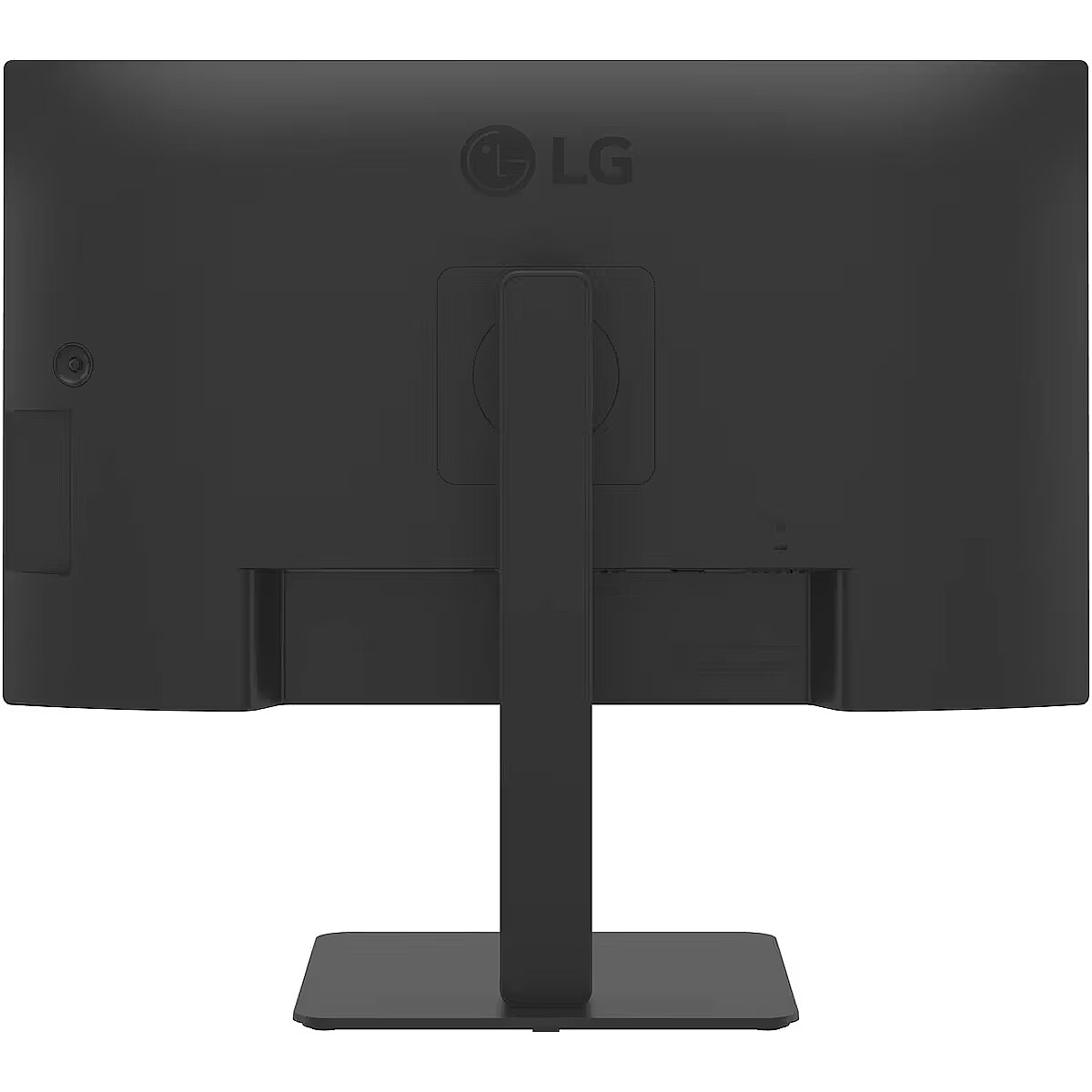
The 27BA54QB offers a variety of ports, solving the problem of limited connectivity for hardworking individuals. With its multiple ports, you can easily connect numerous devices for efficient desk setup. Say goodbye to the frustration of running out of ports. Integrated power module
Fully use your desk
With built-in power, workstations can have a streamlined, spacious setup. This improves space utilization and organization, resulting in a cleaner and more efficient work environment. LG Switch app
Switch swiftly
LG Switch app helps to optimize the monitor for an efficient work environment. You can divide the display into six areas, manage the schedules, or launch a video call platform with a mapped hotkey effortlessly. Ergonomic design
Easy and comfy
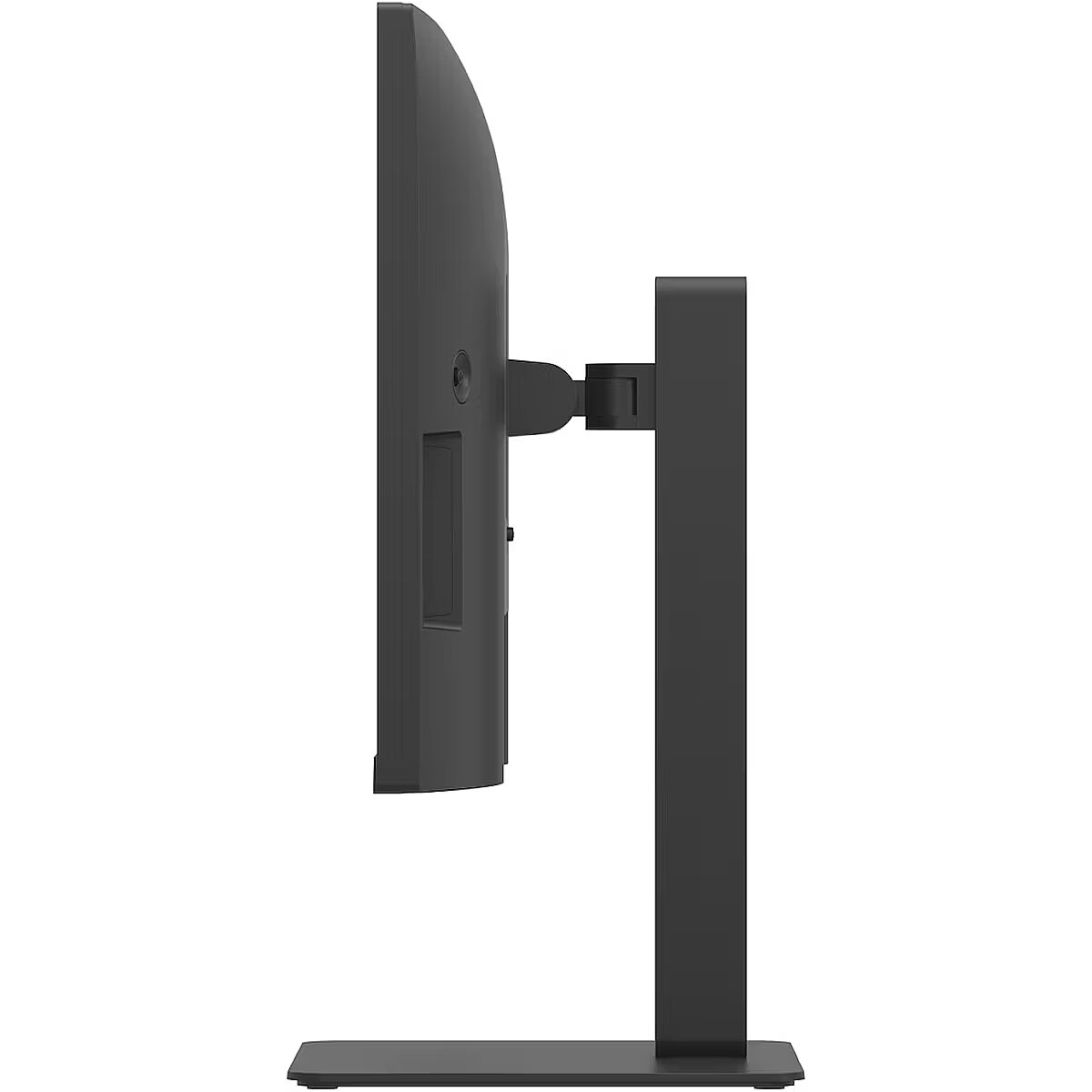
The 27BA450 supports tilt, swivel, pivot, and height adjustment options to make a comfortable workstation for those who spend extended hours in front of monitors. Also, our ergonomic stand facilitates communication with customers or colleagues by allowing for a downward height adjustment. Flicker Safe
Flicker Safe reduces invisible flickering on the screen, which helps reduce eye strain. Reader Mode
Reader Mode adjusts color temperature and luminance that helps to lessen eye fatigue and provide eye comfort while reading documents on a monitor.27” QHD (2560 x 1440) IPS displayHDR10 / sRGB 99% (Typ.)Built-in PowerFlicker Safe & Reader ModeTilt / Height / Swivel / Pivot adjustable standLG Switch app
Design - Frameless design - Yes
Design - Market positioning - Business
Design - Product colour - Black
Display - Anti-glare screen - Yes
Display - Colour depth - 8 bit
Display - Colour gamut standard - sRGB
Display - Contrast ratio (typical) - 1000:1
Display - Display brightness (peak) - 350 cd/m²
Display - Display brightness (typical) - 350 cd/m²
Display - Display diagonal - 68.6 cm (27")
Display - Display diagonal (metric) - 68.466 cm
Display - Display number of colours - 16.7 million colours
Display - Display resolution - 2560 x 1440 pixels
Display - Display technology - LCD
Display - HD type - Quad HD
Display - High Dynamic Range (HDR) supported - Yes
Display - High Dynamic Range (HDR) technology - HDR Effect, High Dynamic Range 10 (HDR10)
Display - Maximum refresh rate - 75 Hz
Display - Native aspect ratio - 16:9
Display - Panel type - IPS
Display - Pixel pitch - 0.2331 x 0.2331 mm
Display - Response time - 5 ms
Display - Response time measurement type - GTG (Gray to Gray)
Display - Screen shape - Flat
Display - sRGB coverage (typical) - 99%
Display - Supported graphics resolutions - 2560 x 1440
Display - Touchscreen - No
Display - Viewing angle, horizontal - 178°
Display - Viewing angle, vertical - 178°
Display > Aspect ratio - 16:9
Display > Display - 2560 x 1440 pixels
Display > Display brightness - 350 cd/m²
Display > Display diagonal - 27 "
Display > Display number of colours - 16.7 M
Display > Display surface - Anti-Glare
Display > HD type - QHD
Display > Maximum refresh rate - 75 Hz
Display > Panel type - IPS
Display > Response time - 5 ms
Display > Viewing angle, horizontal - 178 °
Display > Viewing angle, vertical - 178 °
Display brightness (peak) Display - 350 cd/m²
Display brightness (typical) Display - 350 cd/m²
Display diagonal (metric) Display - 68.466 cm
Display diagonal Display - 68.6 cm (27")
Display number of colours Display - 16.7 million colours
DisplayPort cable length Packaging content - 1.8 m
DisplayPort out quantity Ports & interfaces - 1
DisplayPorts quantity Ports & interfaces - 1
DisplayPort version Ports & interfaces - 1.4
Display resolution Display - 2560 x 1440 pixels
Display technology Display - LCD
EAN - 8806096431160
Energy consumption (HDR) per 1000 hours Power - 27 kWh
Energy consumption (SDR) per 1000 hours Power - 16 kWh
Energy efficiency class (HDR) Power - G
Energy efficiency class (SDR) Power - D
Energy efficiency class Energy Efficiency - D
Energy efficiency scale Power - A to G
EPREL Registration Number Energy Efficiency - 2224735
EPREL Version Number Energy Efficiency - 1
Ergonomics - Adjustable height (max) - 15 cm
Ergonomics - Cable lock slot - Yes
Ergonomics - Cable lock slot type - Kensington
Ergonomics - Height adjustment - Yes
Ergonomics - Number of OSD languages - 17
Ergonomics - On Screen Display (OSD) - Yes
Ergonomics - Panel mounting interface - 100 x 100 mm
Ergonomics - Pivot - Yes
Ergonomics - Swivel angle range - -45 - 45°
Ergonomics - Swivelling - Yes
Ergonomics - Tilt adjustment - Yes
Ergonomics - Tilt angle range - -5 - 21°
Ergonomics - VESA mounting - Yes
Ergonomics > Height adjustment - Yes
Ergonomics > Pivot - Yes
Ergonomics > Swivelling - Yes
Ergonomics > Tilt adjustment - Yes
Flicker-free technology Performance - Yes
Frameless design Design - Yes
Gross Weight Kg - 11,4
GTIN - 8806096431160
HDCP Ports & interfaces - Yes
HDMI Ports & interfaces - Yes
HDMI ports quantity Ports & interfaces - 2
HDMI version Ports & interfaces - 2.2
HD type Display - Quad HD
Headphone out Ports & interfaces - Yes
Height (without stand) Weight & dimensions - 569.7 mm
Height (with stand) Weight & dimensions - 569.7 mm
Height adjustment Ergonomics - Yes
High Dynamic Range (HDR) supported Display - Yes
High Dynamic Range (HDR) technology Display - HDR Effect, High Dynamic Range 10 (HDR10)
Link - https://www.lg.com/de/business/monitore/alle-monitore/ultrawide-monitore/27ba54qb-b/?srsltid=AfmBOorQnhOCq5MfjZIbrHe7qnsITBrbUrSxlRiMnOwfrSujvunvfxY5
LongDesc - 27” QHD IPS displayVivid color at wide anglesLG QHD (2560 x 1440) monitor with IPS technology delivers a clear and consistent color. It can provide vivid color reproduction and help users to view the screen at a wide angle.Versatile business monitors for various workspaceThis versatile monitor can cover various works at many places, such as offices, public institutions, hospitals, and customer service, with a clear IPS display and 3-side virtually borderless design.HDR10 with sRGB 99% (Typ.)See amazing colorsHDR technology is now applied to various content. This monitor is compatible with industry standard HDR10 (High Dynamic Range), based on the sRGB 99% color gamut, supporting specific levels of color and brightness that enables viewers to enjoy the dramatic colors of the content.Multi portsA variety of interfaceThe 27BA54QB offers a variety of ports, solving the problem of limited connectivity for hardworking individuals. With its multiple ports, you can easily connect numerous devices for efficient desk setup. Say goodbye to the frustration of running out of ports.Integrated power moduleFully use your deskWith built-in power, workstations can have a streamlined, spacious setup. This improves space utilization and organization, resulting in a cleaner and more efficient work environment.LG Switch appSwitch swiftlyLG Switch app helps to optimize the monitor for an efficient work environment. You can divide the display into six areas, manage the schedules, or launch a video call platform with a mapped hotkey effortlessly.Ergonomic designEasy and comfyThe 27BA450 supports tilt, swivel, pivot, and height adjustment options to make a comfortable workstation for those who spend extended hours in front of monitors. Also, our ergonomic stand facilitates communication with customers or colleagues by allowing for a downward height adjustment.Flicker SafeFlicker Safe reduces invisible flickering on the screen, which helps reduce eye strain.Reader ModeReader Mode adjusts color temperature and luminance that helps to lessen eye fatigue and provide eye comfort while reading documents on a monitor.
LongProductName - 68.6cm (27") Quad HD 2560 x 1440 IPS, 16:9, 350cd/m², 16.7M, 5ms, 178°/178°, 1000:1
LongSummaryDescription - LG 27BA54QB-B. Display diagonal: 68.6 cm (27"), Display resolution: 2560 x 1440 pixels, HD type: Quad HD, Display technology: LCD, Response time: 5 ms, Native aspect ratio: 16:9, Viewing angle, horizontal: 178°, Viewing angle, vertical: 178°. Built-in speaker(s). Built-in USB hub, USB hub version: 3.2 Gen 1 (3.1 Gen 1). VESA mounting, Height adjustment. Product colour: Black
Manufacturer Code - 27BA54QB-B.AEU
Manufacturer Name - LG Electronics
Market positioning Design - Business
Maximum refresh rate Display - 75 Hz
Multimedia - Built-in camera - No
Multimedia - Built-in speaker(s) - Yes
Multimedia - Number of speakers - 2
Multimedia - RMS rated power - 10 W
Multimedia > Built-in speaker(s) - Yes
Multimedia > TV tuner integrated - No
Name - LG | 27BA54QB-B | 27 " | IPS | QHD | 16:9 | 75 Hz | 5 ms | 2560 x 1440 pixels | 350 cd/m² | HDMI ports quantity 2
Native aspect ratio Display - 16:9
Networking > Ethernet LAN (RJ-45) ports - No
Number of OSD languages Ergonomics - 17
Number of speakers Multimedia - 2
Number of upstream ports Ports & interfaces - 1
NVIDIA G-SYNC Performance - No
On Screen Display (OSD) Ergonomics - Yes
Other features - Brand specific technologies - Black Stabilizer, Super+ Resolution
Package depth Packaging data - 198 mm
Package features > Embeeded battery - No
Package features > Gross depth (mm) - 198.00 mm
Package features > Gross height (mm) - 547.00 mm
Package features > Gross width (mm) - 722.00 mm
Package features > Packing quantity - 1.00 pc(s)
Package features > Palette Qty - 16 pc(s)
Package features > Paper/Pasteboard - 2080.00 g
Package features > Plastic (No PET) - 520.00 g
Package features > Tare weight (kg) - 2.60 kg
Package features > Volume (m3) - 0.08 m³
Package features > WEE classification - CL109:2:2017-04-01
Package features > WEEE tax - Yes
Package height Packaging data - 547 mm
Package type Packaging data - Box
Package weight Packaging data - 10.7 kg
Package width Packaging data - 722 mm
Packaging content - Cables included - AC, DisplayPort
Packaging content - DisplayPort cable length - 1.8 m
Packaging content - Power cable length - 1.8 m
Packaging content - Stand included - Yes
Packaging data - Package depth - 198 mm
Packaging data - Package height - 547 mm
Packaging data - Package type - Box
Packaging data - Package weight - 10.7 kg
Packaging data - Package width - 722 mm
Panel mounting interface Ergonomics - 100 x 100 mm
Panel type Display - IPS
PDF - https://www.blobs.lt/products/2/3/1/1/9/4/79b88a143a7c6ba1ea6097c5f915c0b5/original.pdf
Performance - AMD FreeSync - No
Performance - Flicker-free technology - Yes
Performance - NVIDIA G-SYNC - No
Pivot Ergonomics - Yes
Pixel pitch Display - 0.2331 x 0.2331 mm
Ports & interfaces - Built-in KVM switch - Yes
Ports & interfaces - Built-in USB hub - Yes
Ports & interfaces - DisplayPort out quantity - 1
Ports & interfaces - DisplayPorts quantity - 1
Ports & interfaces - DisplayPort version - 1.4
Ports & interfaces - HDCP - Yes
Ports & interfaces - HDMI - Yes
Ports & interfaces - HDMI ports quantity - 2
Ports & interfaces - HDMI version - 2.2
Ports & interfaces - Headphone out - Yes
Ports & interfaces - Number of upstream ports - 1
Ports & interfaces - USB hub version - 3.2 Gen 1 (3.1 Gen 1)
Ports & interfaces - USB Type-A downstream ports quantity - 2
Ports & interfaces > DisplayPorts quantity - 1
Ports & interfaces > HDMI ports quantity - 2
Power - AC input frequency - 50/60 Hz
Power - AC input voltage - 100 - 240 V
Power - Energy consumption (HDR) per 1000 hours - 27 kWh
Power - Energy consumption (SDR) per 1000 hours - 16 kWh
Power - Energy efficiency class (HDR) - G
Power - Energy efficiency class (SDR) - D
Power - Energy efficiency scale - A to G
Power - Power consumption (off) - 0.3 W
Power - Power consumption (standby) - 0.5 W
Power - Power supply type - Internal
Power cable length Packaging content - 1.8 m
Power consumption (off) Power - 0.3 W
Power consumption (standby) Power - 0.5 W
Power supply type Power - Internal
Product colour Design - Black
ProductName - 27BA54QB-B
Product Net Weight - 8.1 kg
Response time Display - 5 ms
Response time measurement type Display - GTG (Gray to Gray)
RMS rated power Multimedia - 10 W
Screen shape Display - Flat
Short description - LG LCD 27BA54QB-B 27" black
ShortSummaryDescription - LG 27BA54QB-B, 68.6 cm (27"), 2560 x 1440 pixels, Quad HD, LCD, 5 ms, Black
sRGB coverage (typical) Display - 99%
Stand included Packaging content - Yes
Summary - LG 27BA54QB-B. Display diagonal: 68.6 cm (27"), Display resolution: 2560 x 1440 pixels, HD type: Quad HD, Display technology: LCD, Response time: 5 ms, Native aspect ratio: 16:9, Viewing angle, horizontal: 178°, Viewing angle, vertical: 178°. Built-in speaker(s). Built-in USB hub, USB hub version: 3.2 Gen 1 (3.1 Gen 1). VESA mounting, Height adjustment. Product colour: Black
Supported graphics resolutions Display - 2560 x 1440
Sustainability - Sustainability certificates - ENERGY STAR, EPEAT, TCO
Sustainability certificates Sustainability - ENERGY STAR, EPEAT, TCO
Swivel angle range Ergonomics - -45 - 45°
Swivelling Ergonomics - Yes
Technical details > Connectivity - HDMI, USB 3.2, DisplayPort
Technical details > Dimensions with stand - 61.35 x 56.97 x 25 cm
Technical details > Gross weight - 10.70 kg
Technical details > Net weight - 8.10 kg
Technical details > Producer - LG
Technical details > Producer product name - 27BA54QB-B
Technical details > USB-C - No
Technical details > USB-C power delivery - N/A
Tilt adjustment Ergonomics - Yes
Tilt angle range Ergonomics - -5 - 21°
Title - LG 27BA54QB-B computer monitor 68.6 cm (27") 2560 x 1440 pixels Quad HD LCD Black
Touchscreen Display - No
Unit Box Height - 0.51
Unit Box Length - 0.715
Unit Box Width - 0.22
Unit Calculated Volume - 0.08022 cubm
Unit Calculated Weight - 11.9 kg
Units per Pallet - 0
URL - https://www.lg.com/global/business/monitors/lg-27ba54qb#
USB hub version Ports & interfaces - 3.2 Gen 1 (3.1 Gen 1)
USB Type-A downstream ports quantity Ports & interfaces - 2
Vendor Homepage - https://www.lg.com/global/business/monitors/lg-27ba54qb#
VESA mounting Ergonomics - Yes
Viewing angle, horizontal Display - 178°
Viewing angle, vertical Display - 178°
Warranty - 36
Warranty - 36 month(s)
Warranty - 36 months
WarrantyInfo -
Weight & dimensions - Depth (without stand) - 63 mm
Weight & dimensions - Depth (with stand) - 250 mm
Weight & dimensions - Height (without stand) - 569.7 mm
Weight & dimensions - Height (with stand) - 569.7 mm
Weight & dimensions - Weight (without stand) - 5.3 kg
Weight & dimensions - Weight (with stand) - 8.1 kg
Weight & dimensions - Width (without stand) - 613.5 mm
Weight & dimensions - Width (with stand) - 613.5 mm
Weight (without stand) Weight & dimensions - 5.3 kg
Weight (with stand) Weight & dimensions - 8.1 kg
Width (without stand) Weight & dimensions - 613.5 mm
Width (with stand) Weight & dimensions - 613.5 mm





 DVI is a digital standard and ensures high image quality, however, thanks to the big size of the plug and the inability of the standard to develop further due to a few technical restrictions this type of connection is gradually losing its popularity to modern HDMI and DisplayPort standards.




